
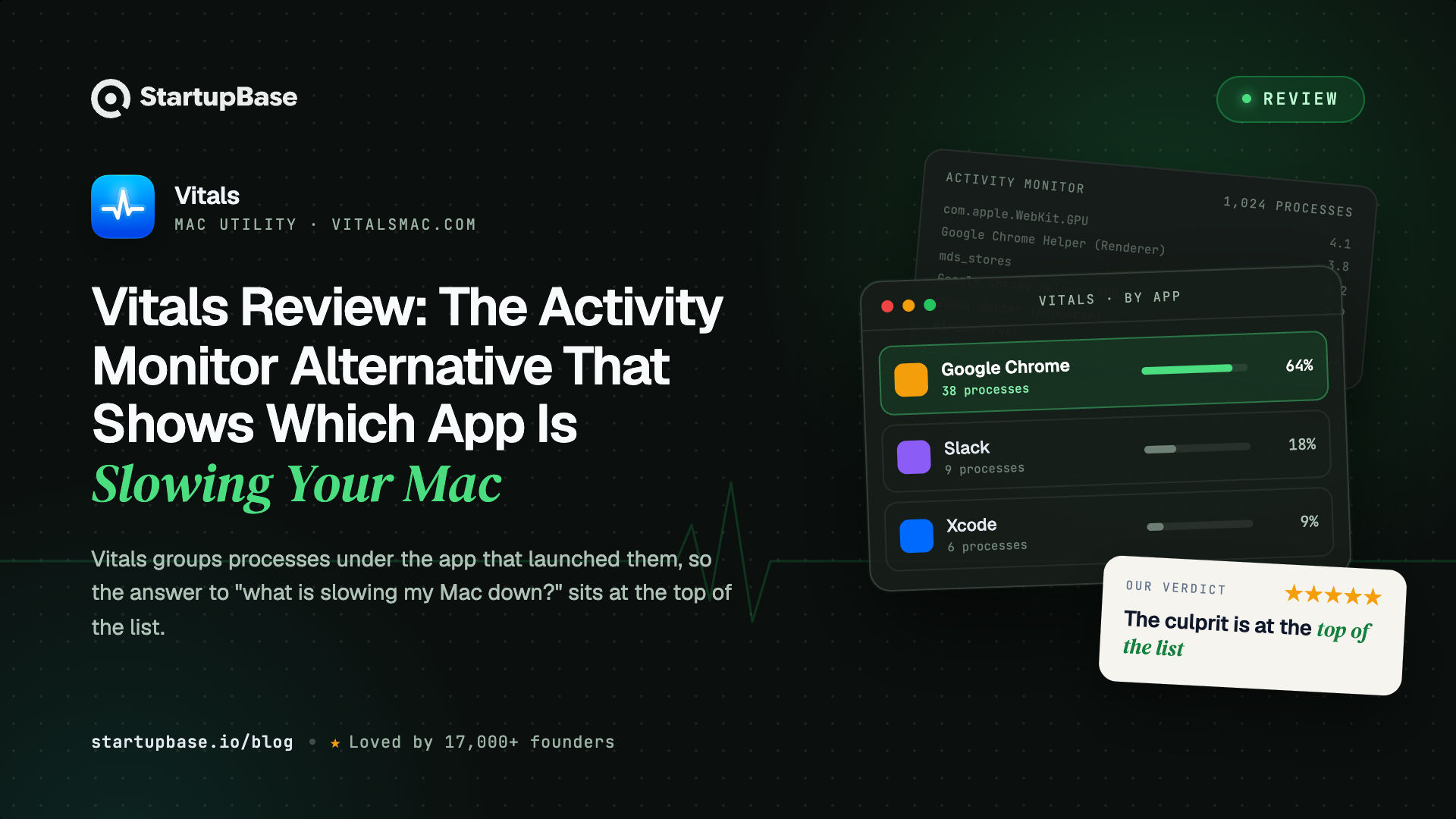
Vitals is a native Mac app that groups every process under the app it belongs to, keeps 30 days of history per app, alerts you when an app misbehaves, and finds idle dev servers by project. This review covers how it works, how it compares to Activity Monitor, iStat Menus and Stats, what it costs, and who it suits.
Quick Answer
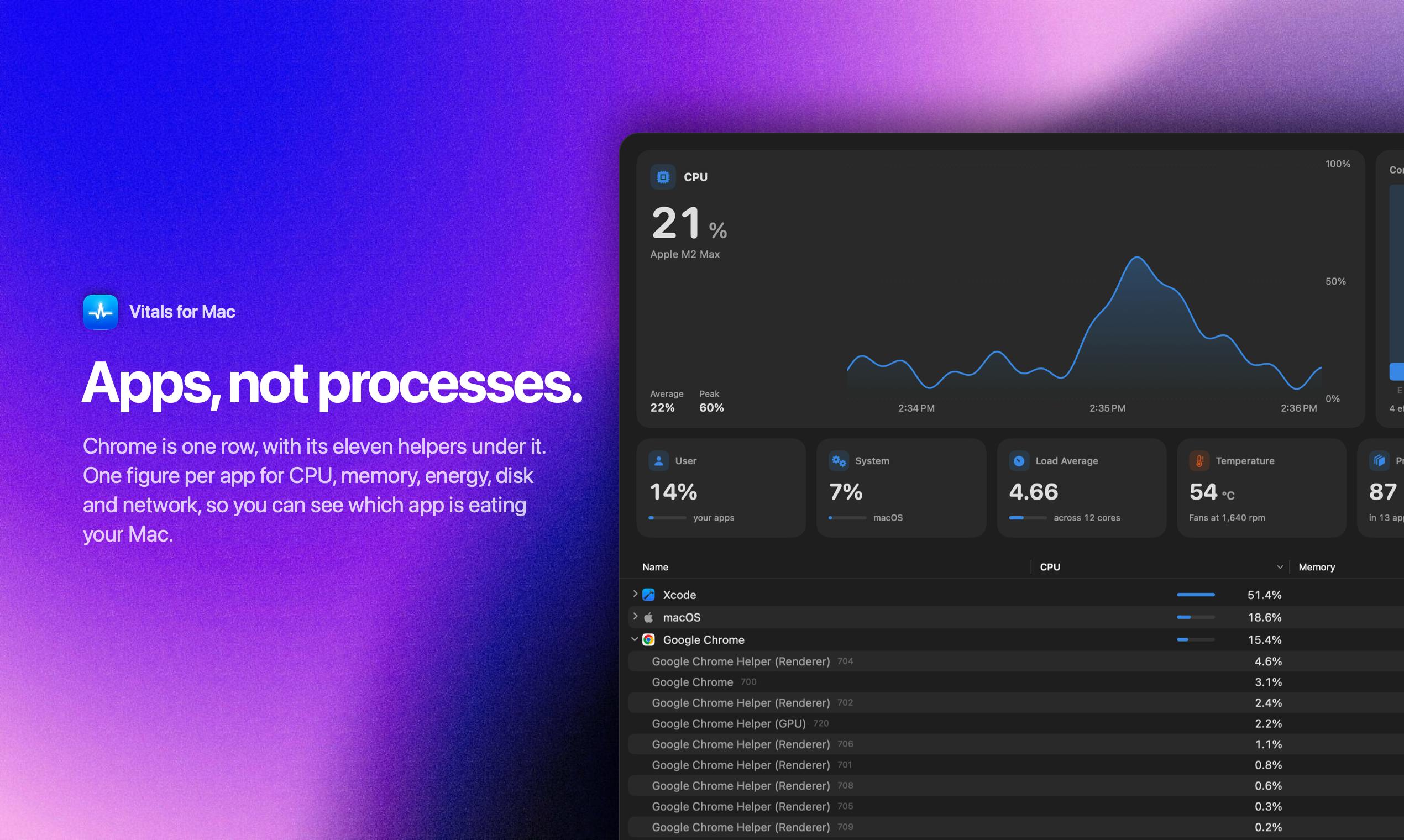
When your Mac slows down or the fans start spinning, you want to know one thing: which app is causing it. Activity Monitor does not tell you. It lists every process on your Mac, often more than 1,000 of them, and Chrome alone can appear as nearly a hundred separate "Google Chrome Helper" rows. To get the real total for one app, you have to add the numbers up yourself.
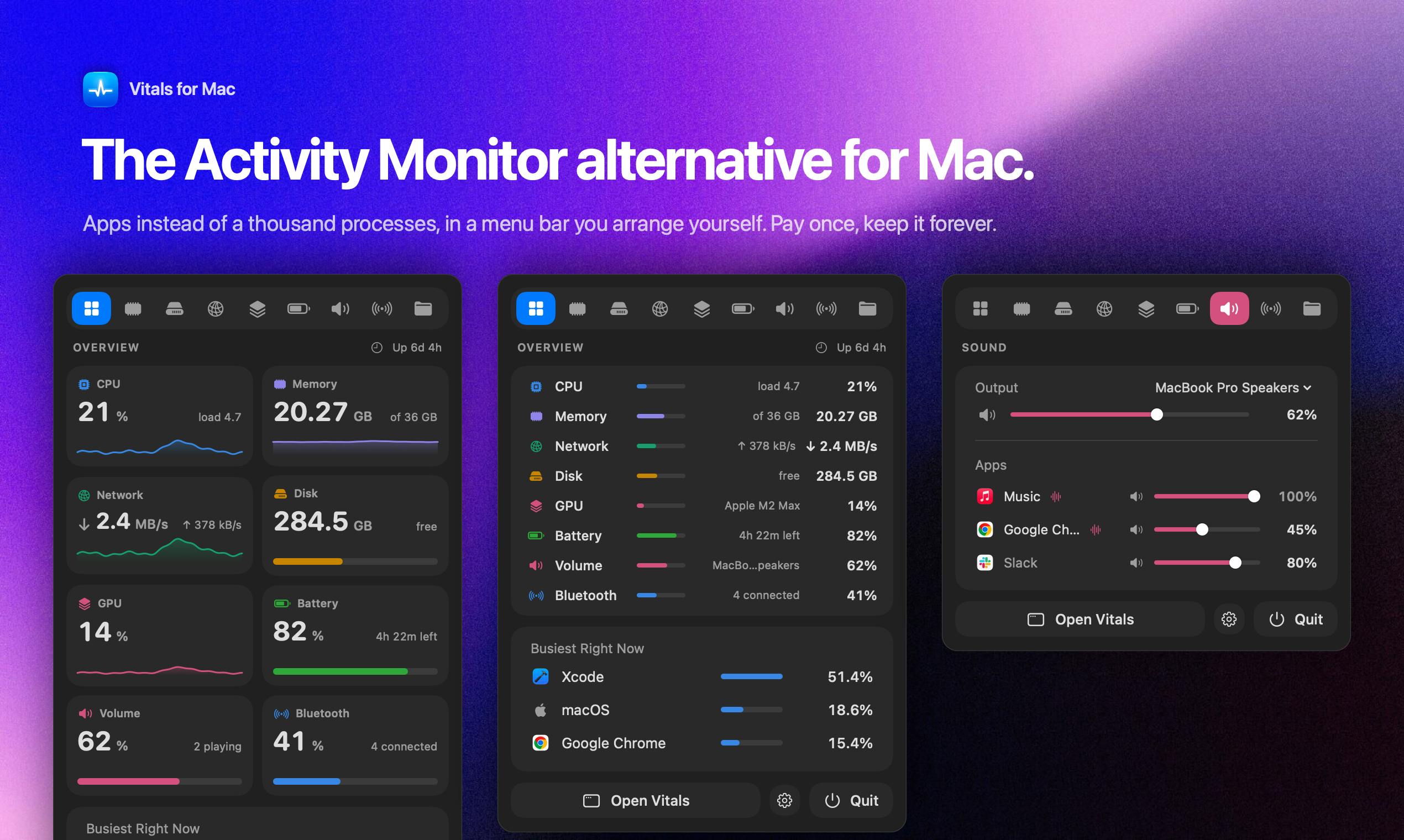
Vitals fixes that. It puts every process under the app it belongs to, so you see about 60 apps instead of 1,000 processes, with the busiest one at the top. It also keeps 30 days of history, warns you when an app misbehaves, and finds the dev servers you forgot to stop.
Why Activity Monitor is not enough
Activity Monitor shows what each process is doing right now. That worked when one app meant one process. Today a browser with a few tabs open can run close to a hundred helper processes, and an editor like VS Code runs dozens more. Each one gets its own row, and none of them shows the total for the app.
Developers have a second problem on top. Most have a few Node or Python servers running that they forgot about days ago, each holding a port and a few hundred megabytes. Activity Monitor calls every one of them "node", with no idea which project it belongs to.
What Vitals does differently
Vitals shows apps, not processes. Every helper process is added to the app that launched it, so Chrome becomes one row with one number each for memory, CPU, energy, disk and network. To see what is using your memory, you look at the top of the list.
From there:
- Click any app and a drawer opens with everything about it: memory and CPU over the last few minutes, power, GPU, disk and network, every process under it, and Quit.
- 30 days of history, per app, so you can see when your Mac slowed down and which app did it.
- Alerts when an app keeps using too much CPU, keeps growing in memory, or hammers the disk or network.
- Projects: the dev servers you left running, grouped by project folder, with their ports and how long they have been idle.
- The menu bar: every readout can be its own item, shown as a value, a graph or both, in the order you drag them.
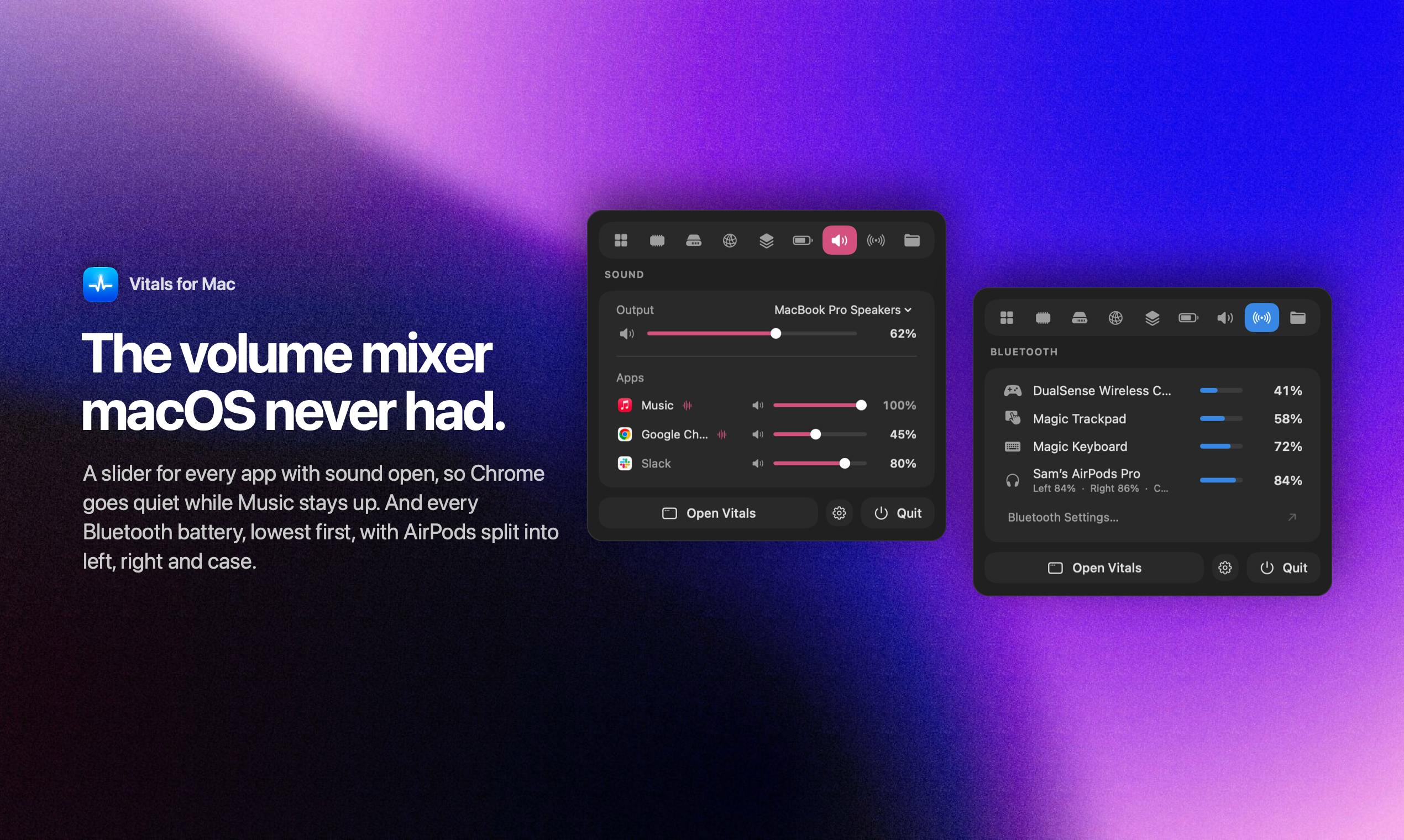
- Sound: a volume slider for every app that is playing audio.
- Bluetooth: every connected device and its battery, lowest first.
- Hardware: CPU and GPU temperatures, fan speeds you can set, battery health and power per app.
The dev servers you forgot about
For developers, this is the most useful part of Vitals. It groups running processes by the project folder they started in and shows the ports they use. When a server has been running for days without doing anything, Vitals marks it as idle and lets you stop it, one at a time or all at once. That frees the memory and the port. It always asks before stopping anything.
So the next time you see "port 3000 is already in use", you can find the server and stop it in a couple of clicks.
How Vitals compares to Activity Monitor, iStat Menus and Stats
Against Activity Monitor, row by row:
| Activity Monitor | Vitals | |
|---|---|---|
| What the list shows | Every process, about 1,000 rows | Every app, about 60 rows |
| Figures per app | You add up the helpers yourself | One figure per app, helpers included |
| History | Live graphs, 12 hours for energy | 30 days for every metric, per app |
| Alerts | None | High CPU, growing memory, heavy disk or network |
| Menu bar | None | One item per readout, arranged as you like |
| Dev servers and ports | None | Grouped by project, idle ones pointed out |
| Temperatures and fans | None | Included, with fan control |
| Price | Included with macOS | One payment, $29 regular |
Activity Monitor and the terminal tools such as htop and btop all show processes and leave the adding up to you.
Menu bar monitors like iStat Menus and Stats are good at showing how busy your Mac is, with gauges and graphs. They do not show which app is behind those numbers. Vitals shows both: the overall numbers in the menu bar, and the apps behind them in its window.
For the detail, Vitals keeps a product by product comparison of Activity Monitor alternatives.
How it is built
Vitals is a native Mac app written in Swift and SwiftUI. There is no Electron and no web view. It is 12 MB, signed and notarized by Apple, and runs on Apple silicon and Intel Macs with macOS 15 or later.
A system monitor should not slow your Mac down itself. With no window open, Vitals samples every five seconds and uses about a tenth of a percent of one core. It only samples faster while you are looking at it, and it shows up in its own charts like any other app.
Everything it learns stays on your Mac. There is no account and no analytics. Your history, your app list and your project names never leave the machine, and the app makes two network requests: one to check for updates and one to check your licence.
It is not on the Mac App Store. The App Store sandbox stops an app from reading other apps' processes, which is the one thing an activity monitor has to do.
What early users say
When Vitals launched on X, 170 licences sold in the first four hours and more than 600 in the first two days. All 1,000 licences at the $5 launch price have since sold.
Updates have come quickly too, from Force Quit in Projects and a Keep in Dock option to the arrangeable menu bar, per-app volume and Bluetooth batteries. Version 1.3.1 adds free memory to the menu bar and a new Layout page.
"Best $5 I ever spent." Steve Chazin
"macOS Activity Monitor is horrible when I'm juggling dev projects and local AI. Vitals is so much better." Knowix
"After years of using iStats, I've uninstalled it, even with a lifetime license." DustyFski
What it costs
The regular price is $29 for one Mac. The launch price started at $5 for the first 1,000 licences and rises in steps as they sell. At the time of writing it is $9, and the site shows the live price and how many licences are left at it.
It is one payment, not a subscription, and every update is included for life. There is no account, and you can move your licence to a new Mac whenever you like. Bundles cost less per Mac, from $99 for 5 Macs up to $699 for 50. Students and teachers get half price, and if you own Flit, the Mac dictation app, its Lifetime licence includes Vitals for free.
There is no free trial, but there is a 14-day refund.
Before you buy
It needs macOS 15 or later. Older Macs that cannot run Sequoia cannot run Vitals.
It is Mac only. There is a waitlist for Windows.
Activity Monitor keeps a few specialist tools. Sampling a process, for example. For everyday questions about memory, battery and slowdowns, Vitals covers it.
What is next
The public roadmap lists, in order: an MCP server so your AI assistant can ask Vitals before it touches your Mac, an Agents tab for Claude Code, Codex and similar tools, a storage map of what is taking your disk space, safe cleanup of caches and old build files, and disk activity for each connected drive. All of it is included in the one payment.
Who it suits
If your Mac slows down and Activity Monitor leaves you guessing, Vitals shows the app responsible at the top of the list.
If you are a developer with local servers, Docker and an editor running all day, Projects alone will free memory and ports you did not know you were holding.
If you already use a menu bar monitor and want to know which app is behind the numbers, Vitals shows both.
If you dislike subscriptions, it is one payment with lifetime updates.
Questions people ask
What is the best Activity Monitor alternative for Mac?
If you want to know which app is slowing your Mac down, Vitals is built for that. It groups processes by app, keeps 30 days of history and alerts you when an app misbehaves. Activity Monitor does none of these.
How is Vitals different from Activity Monitor?
Activity Monitor lists about 1,000 processes. Vitals lists about 60 apps, with every helper added to the app that launched it, so each app has one figure for memory, CPU, energy, disk and network.
How is Vitals different from iStat Menus or Stats?
Those apps show how busy your Mac is. Vitals shows that too, in the menu bar, and also which app is responsible, with per-app history and alerts.
Does Vitals slow down my Mac?
With no window open it samples every five seconds and uses about a tenth of a percent of one core.
How much does Vitals cost?
The regular price is $29 for one Mac, paid once. During the launch it costs less, rising in steps as licences sell. There is a 14-day refund.
Why is Vitals not on the Mac App Store?
The App Store sandbox stops an app from reading other apps' processes. Vitals is signed and notarized by Apple instead.
Verdict
Activity Monitor shows you what every process is doing. Vitals shows you which app is responsible, and adds what Activity Monitor is missing: 30 days of history, alerts, a menu bar you can arrange, and a list of the dev servers you forgot to stop.
It is a small native app, it keeps everything on your Mac, and it costs one payment with lifetime updates. If you want a quick answer the next time your Mac slows down, Vitals gives you one, and the 14-day refund means there is little risk in trying it.
Browse more of our product reviews.
Want a review like this for your own product? Order a StartupBase review.
Developer Tools
Mac Apps
Productivity









 Continue with Google