
Flit is a macOS dictation app that transcribes and formats speech entirely on your own Mac, with no account, no telemetry and no server. This review covers how the formatting works, the developer mode that indexes your codebase, a direct comparison with Wispr Flow on privacy and cost, what the app cannot do, and who should buy something else.
Quick Answer
Every dictation app in this category has a privacy page, and every one of them says roughly the same thing. We do not sell your data. You are in control. Opt out whenever you like.
Those are promises, and promises are only as good as the company making them and the incentives it is under in three years. The more interesting question is not what a company promises to do with your voice. It is whether your voice ever reaches them in the first place.
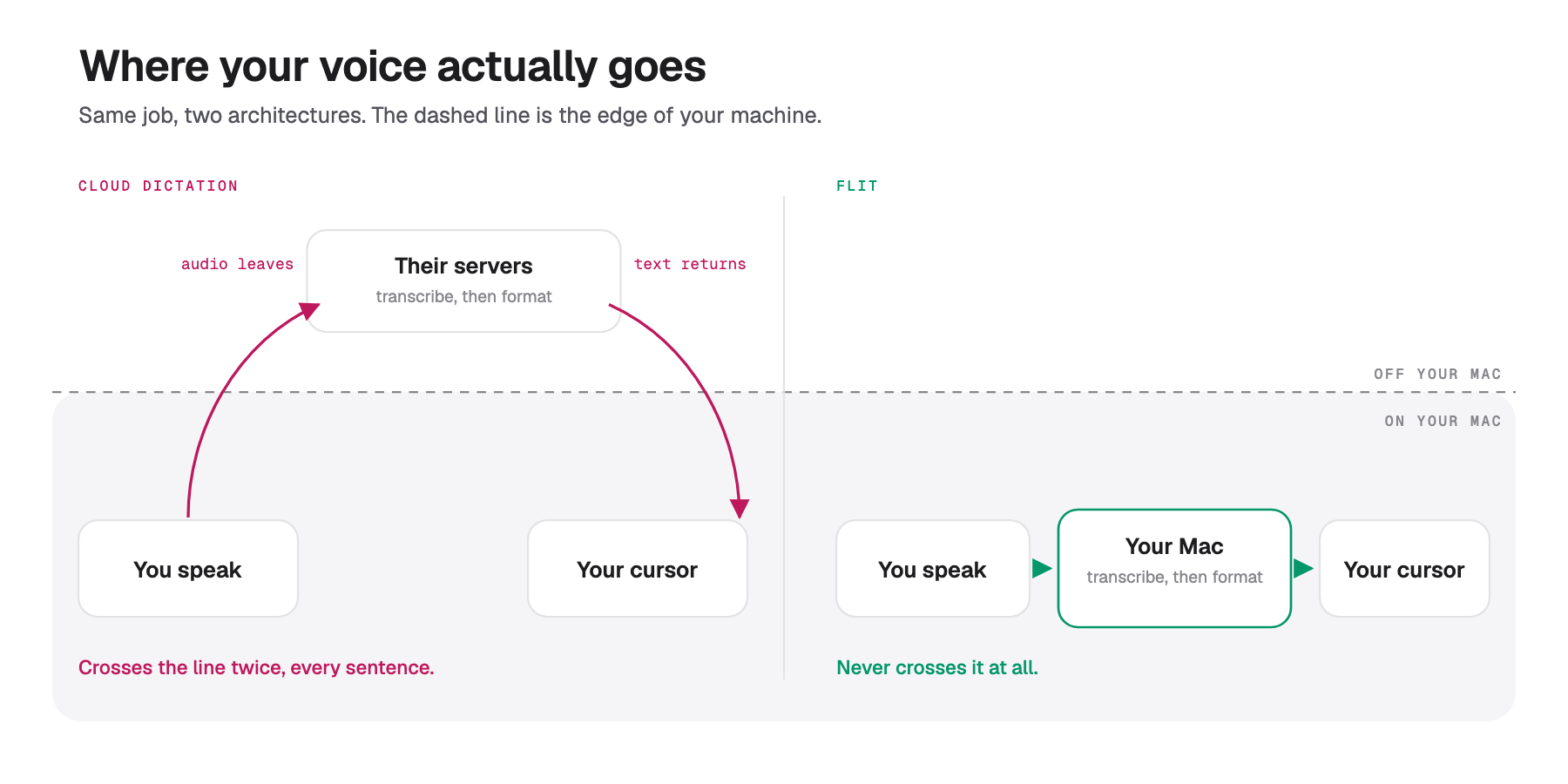
Flit is a macOS dictation app built so that question has a boring answer. You hold a key, speak, and let go. Under a second later the finished text is at your cursor in whatever app you were in. The transcription, the cleanup and the formatting all happen on your own Mac, and no audio, text or screen content is sent anywhere at any point.
What it actually does
The demo is unremarkable to describe and the point is that it is fast. Hold Fn, say a sentence, release. About 0.7 seconds later the text lands, already cleaned up.
The cleanup is the product. Dictation tools have been able to transcribe accurately for years; what they hand you is a transcript, complete with every "um" and false start, and you do the tidying. Flit does the tidying before the text arrives.
Say "um so can we uh meet at 1030 AM on, on friday" and what appears is "Can we meet at 10:30 AM on Friday?" Say "the budget is uh three hundred dollars scratch that four hundred dollars" and you get "The budget is $400", because "scratch that" cancels the statement before it. Doubled words, spoken emails and URLs are written the way you would have typed them.
Text appears while you are still talking, which matters more than it sounds. You catch a wrong word mid-sentence rather than proofreading afterwards.
There are three ways to start: hold a key for a sentence or two, tap once to lock recording on for longer stretches, or arm hands-free mode and let it begin when you start speaking. Escape cancels and deletes the audio.
The part that is not left to a model
This is the design decision worth understanding, because it is what separates a tool that is usually right from one that is reliably right.
A language model is good at judgment and unreliable at precision. Ask it to decide the tone of a Slack reply and it does well. Ask it to render "ten thirty AM" and it will produce 10:30 AM most of the time, which is a different thing from every time.
So Flit splits the work. Anything with exactly one correct answer is handled by fixed rules: clock times, more than 60 spoken punctuation commands, words from your personal dictionary, snippets, file names from your open project. The model only gets the judgment calls, which are tone, sentence flow and deciding which filler was filler. If the model returns something odd, Flit discards it and keeps the deterministic result.
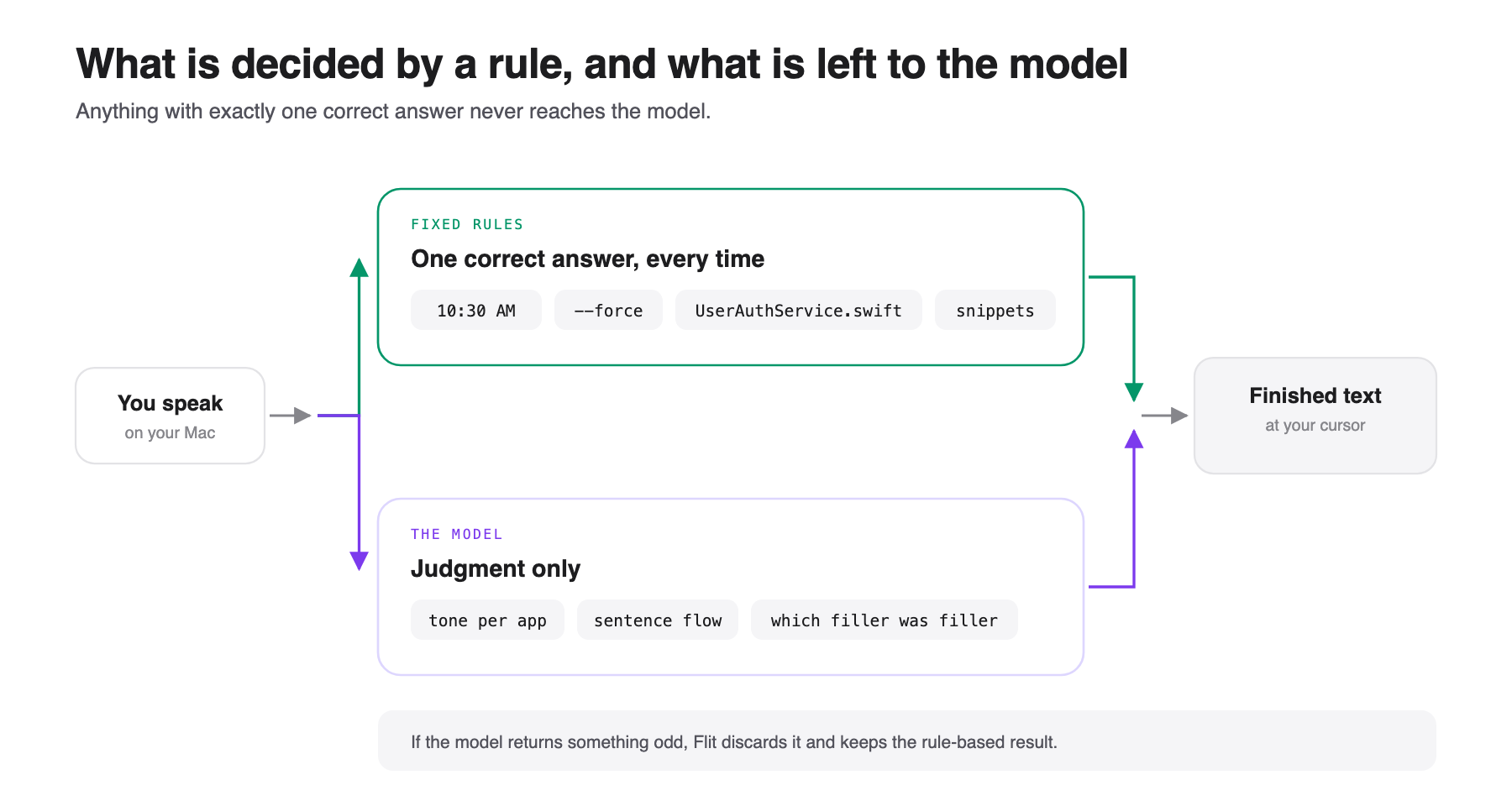
The practical effect is that "dash dash force" always becomes --force and never becomes "dash dash force" or "--Force". For anyone dictating into a terminal, that distinction is the entire point.
Formatting also adapts per app. The same sentence comes out casual in Messages, more formal in Mail, and completely verbatim in Terminal, and you can set your own rule for each app.
Developer mode
The least obvious feature here, and the one most likely to matter if you write code.
Dictating into an editor or terminal, Flit indexes the open project's file and symbol names locally. Say "open user auth service dot swift" and you get UserAuthService.swift rather than a phonetic guess. Say something the engine mishears as "voice snicket store" and it still resolves to VoiceSnippetStore.swift, because it can see the real name in your project.
It reads file names and paths only, never file contents, and the index stays in memory rather than touching disk or network. In terminals and editors your words are never reworded, so a shell command survives intact.
It works in Cursor, VS Code, Xcode, Zed, Warp, iTerm, JetBrains, Sublime and Terminal.
How Flit compares to Wispr Flow
Wispr Flow is the market leader here and the reason most people arrive at this category, so this comparison is the one that matters. Figures below come from each company's own pages, checked in September 2026.
| Flit | Wispr Flow | |
|---|---|---|
| Where transcription happens | On your Mac, always | "Transcription always happens in the cloud" |
| Works offline | Yes, fully | No |
| Account required | No | Yes |
| Price | $49 once, currently $19 | $12 a month billed annually, or $13 monthly |
| Platforms | macOS only, Apple silicon | Mac, Windows, iPhone, Android |
Three things stand out.
On privacy, the difference is structural rather than a matter of policy. Wispr's own privacy page states that transcription always happens in the cloud, for speed and accuracy. That is not a setting you can switch off; it is how the product works. Their training controls are real and they are prominent, but they govern what happens to your voice after it arrives on their servers. With Flit the audio never leaves, so there is no policy to read and nothing to opt out of. You can open Little Snitch, dictate all day, and watch nothing happen. It is the same distinction we drew in our review of Graded Prompts, where a badge asks you to trust somebody else's check and the included credits let you run it yourself.
One detail worth being precise about, because it is easy to overstate. Wispr lets every user opt out of model training, and says so clearly. What is reserved for Enterprise is the enforced version: their feature table puts a tick next to "Models never trained on your data" in the Enterprise column only, and describes Enterprise as having "model training locked off". So on an individual plan you are relying on a toggle and a promise rather than a contractual guarantee. That is not the same as Wispr training on your voice against your wishes, and this review is not claiming that.
On cost the gap widens every month. Wispr Pro is $144 a year at the annual rate. Flit is $49 once, or $19 during launch, and covers two Macs. Over three years that is roughly $432 against $49.
And Wispr genuinely wins several things. It runs on Windows, iPhone and Android, so if you dictate anywhere other than a Mac, Flit is not a candidate at all. It has a permanently free tier at 2,000 words a week, where Flit gives you seven days. It has a meeting notetaker, which Flit does not attempt. And it is a funded company with a support team behind it rather than one person.
What it costs
A personal licence is $49 once, currently $19 for the first 50 licences, and covers two Macs with 12 months of updates. After that year you keep the app; a lifetime tier at $59, normally $99, covers every future update.
Team licensing is per Mac and drops with volume, from $39 each down to $29 at 25 Macs.
Seven days free with no card and no account, and a 30 day refund.
Things to weigh
macOS 14 or later, Apple silicon only. No Windows, no Intel Macs, and no plans for either. If your team is mixed, this cannot be the standard tool.
There is no paperwork for a procurement team. Flit has no audit report to hand over, because there is nothing to audit when nothing is transmitted. That is a stronger position than a certificate if you are choosing for yourself, and no help at all if somebody in security needs a document before you can install it.
One person builds it. Fixes land quickly and there is nobody to escalate to. Worth knowing before you standardise a team on it.
The models are a download. Speech models run from 75 MB to 1.6 GB depending on which you choose, which is the cost of not using somebody else's servers.
It is new. Version 1.0.9 at the time of writing. The privacy architecture is verifiable today, but the track record is not there yet, because there has not been time for one.
Who it suits
If you write all day on a Mac and the idea of your voice going to a server bothers you, this is the most direct answer available, and the verification takes two minutes with any network monitor.
If you work with material you cannot send to a third party, whether that is client work, legal notes or patient records, the architecture is the point. Nothing to upload means nothing to leak, and no vendor holding a copy.
If you dictate code, developer mode is a real differentiator and nothing else in the category does it.
If you resent subscriptions on principle, $49 once against $144 a year makes the case on its own.
It suits you less if you dictate on anything other than a Mac, if you need compliance documents for a security review, if you want meeting notes as well, or if 2,000 words a week free is genuinely all you need.
Questions people ask
Does Flit send my voice anywhere?
No. Transcription, cleanup and formatting all run on your Mac. The only network use is downloading a speech model or checking for an update, and you can verify that with a network monitor.
Is Flit a good Wispr Flow alternative?
A note on the name first, because a lot of people search for it the other way: the product is Wispr Flow, not Whisper Flow. The confusion is understandable, since most of these tools are built on OpenAI's Whisper models.
For Mac users, yes, and the trade is specific. You give up Windows, iPhone and Android support, and a permanently free tier. You get local processing, no account, offline use and a one-time price instead of a subscription.
Does Wispr Flow train on your voice?
Wispr lets you opt out of model training on any plan, in Settings under Data and Privacy, and says it never sells your data. Its feature table lists "Models never trained on your data" as an Enterprise line item, so individual users have a toggle rather than a contractual guarantee. Transcription itself always happens on their servers.
What does Flit cost?
$49 once for two Macs, currently $19 for the first 50 licences, including 12 months of updates. A lifetime tier is $59. There is a 7 day free trial with no card.
What are the requirements?
macOS 14 or later on Apple silicon. There is no Windows version and none planned.
Does it work offline?
Completely. Turn off wifi and nothing changes.
Verdict
The interesting thing about Flit is not that it is private. Every tool in this category says it is private, and most of them mean it.
The interesting thing is that it has removed the need to believe anyone. A privacy policy is a company telling you what it intends to do with something it already has. Local processing means it never has it, which is a different category of assurance, and the only one that survives a change of ownership, a change of business model or a breach.
That architecture costs Flit real things, and this review has listed them: one platform, no free tier, no meeting notes, and a version number starting with one. If any of those matter to you, Wispr Flow is the better product and is priced like one.
But if you are on a Mac, you write for a living, and you have ever hesitated before dictating something sensitive, the honest summary is that this removes the hesitation for $49 once. There is not much else in the category that can say the same.
👉 Try Flit for seven days free, or read what it does and does not send first.
Browse more of our product reviews.
Want a review like this for your own product? Order a StartupBase review.
Mac Apps
Productivity
Privacy








 Continue with Google