
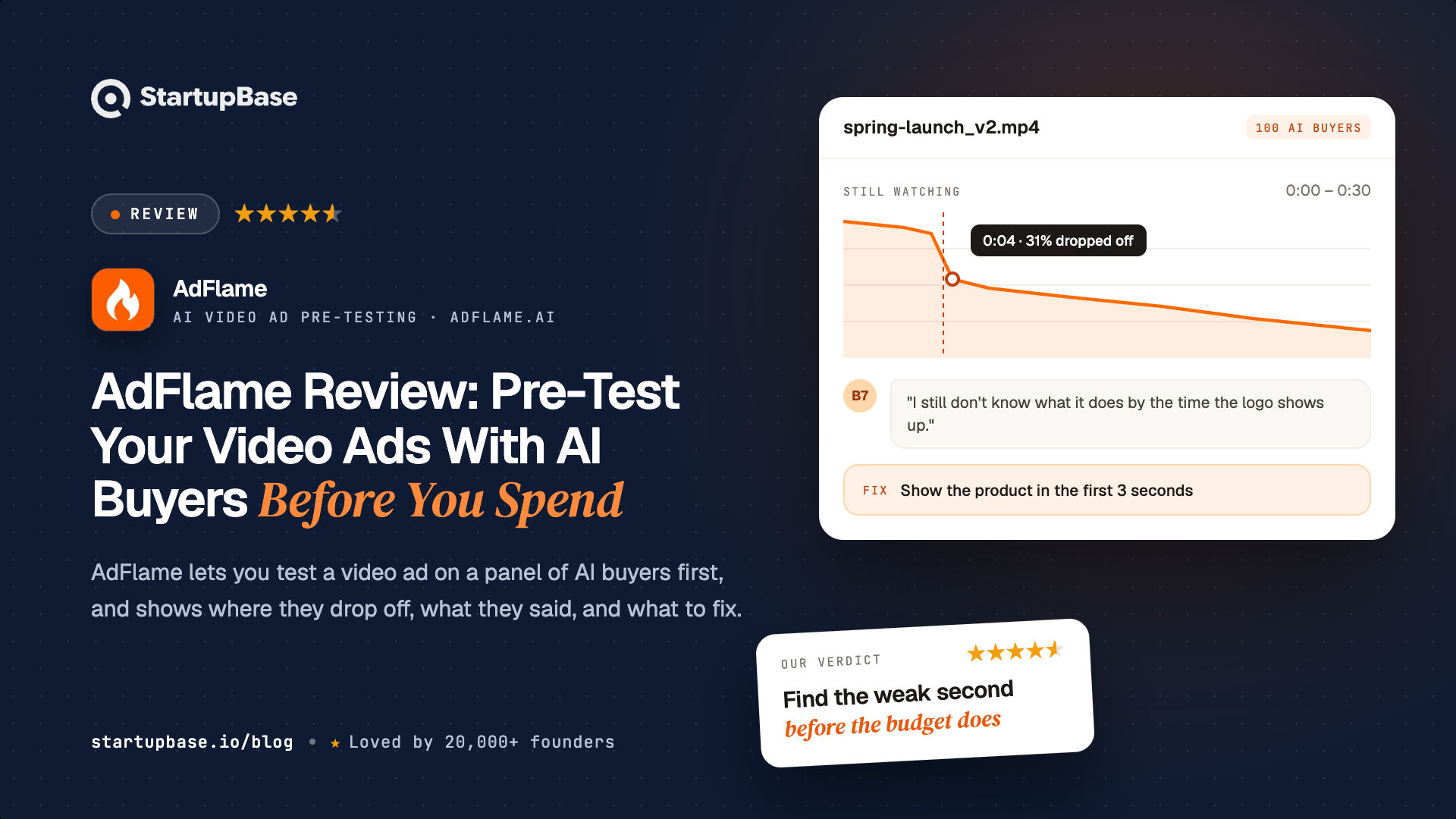
AdFlame is an ad creative testing tool that shows a video ad to 50 to 500 AI buyers before launch. This review covers how it works, how to calculate hook rate and hold rate, hook rate benchmarks and tips, TikTok and Reels safe zones, signs of creative fatigue, pricing, and how AdFlame fits next to live testing.
Quick Answer
Most media buyers know this problem. You launch a new video ad, wait for the learning phase, and a week later the numbers say it did not work. By then, the budget is spent.
The usual answer is to test more creatives in live campaigns. That works, but every test costs real ad spend, and the ad manager only tells you that an ad failed, not why. It shows the click-through rate, not the second where viewers scrolled away.
AdFlame is built to answer that question before you spend. You upload a video ad of up to 60 seconds, and a panel of AI buyers, built on detailed demographic and psychographic profiles, watches it and reacts second by second. You see where they drop off, what they said about the ad, whether your captions are hidden under TikTok or Reels buttons, and which fixes matter most.
This review is based on the AdFlame website, its benchmarks page, its pricing and details from the AdFlame team. We have not compared its predictions with live campaign results.
What AdFlame does
AdFlame is an ad creative testing tool for short-form video, used before launch. It works with TikTok, Meta Reels and Stories, YouTube Shorts and in-stream ads, Instagram, LinkedIn, Snapchat and X video.
It takes three steps:
- Upload the video. An MP4 or MOV file up to 60 seconds and 50 MB, in 9:16, 1:1, 4:5 or 16:9.
- AI buyers watch it. Between 50 and 500 AI buyers, depending on your plan, react to the ad second by second. They are grouped into types such as the Skeptical Shopper, the Impulse Buyer and the Bargain Hunter.
- Get the report. In about two minutes, you get the results and a list of fixes.
The report has more than 20 metrics. Most media buyers will start with three: the hook rate, the drop-off graph and the safe zone check.
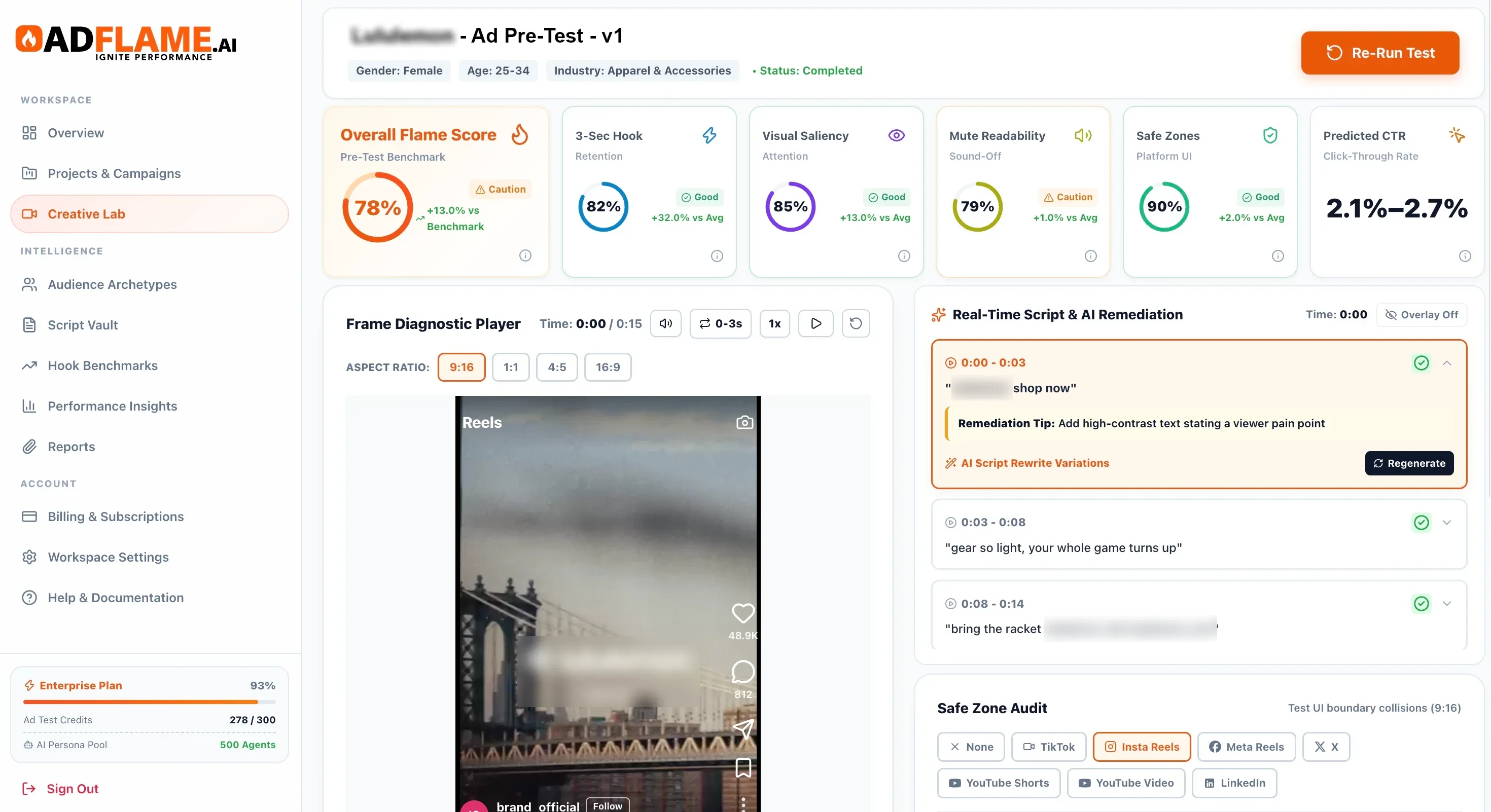
What you see in an AdFlame report
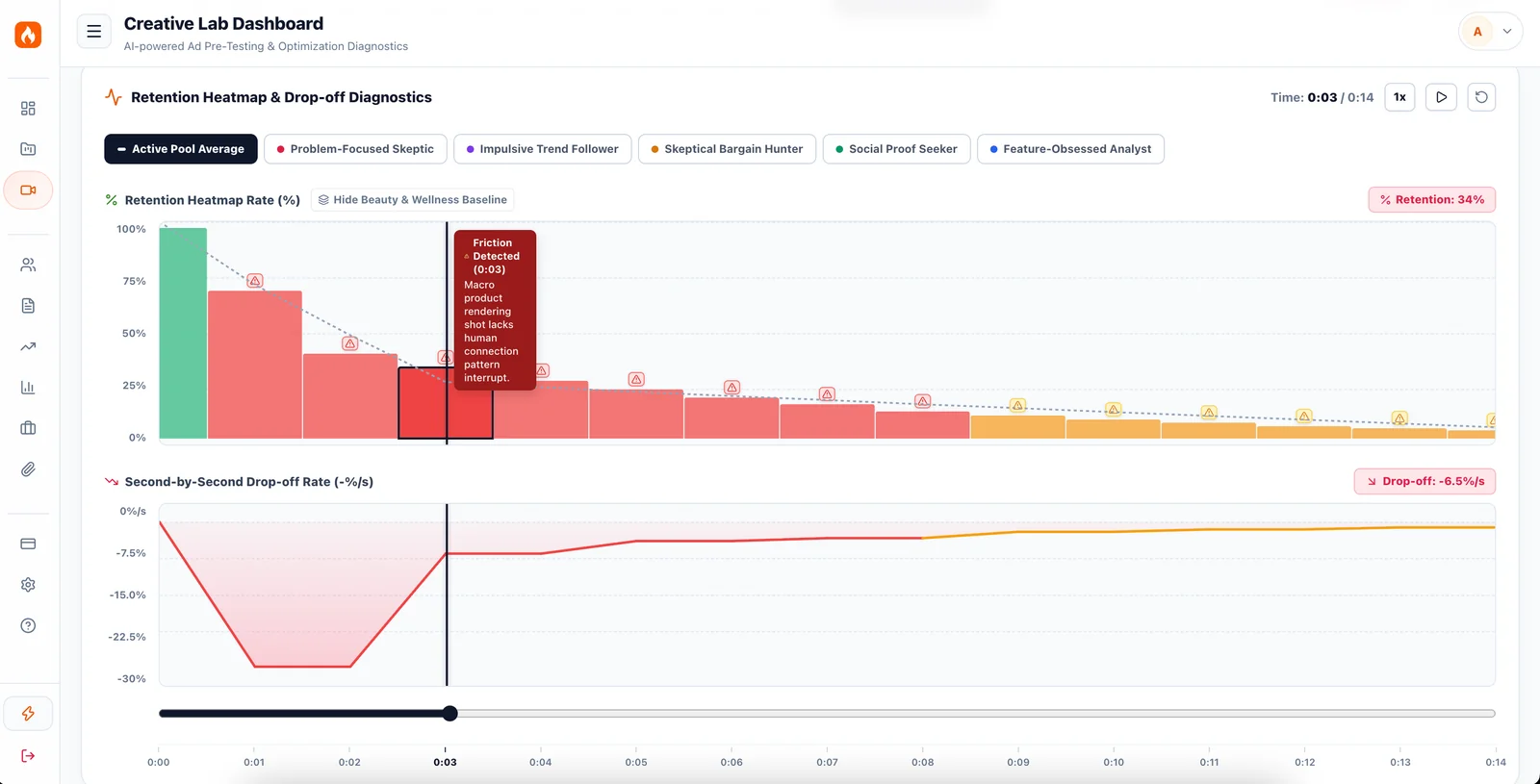
The second viewers drop off. A second-by-second graph shows when each buyer type stops watching. A note such as "Skeptical Shopper: 34% drop at 0:02" tells you which part of the audience you lost, and when.
Retention heat maps. These show how many viewers are left at each second, and mark the moments where the ad loses people, with a short reason. You can see which scenes to cut or speed up.
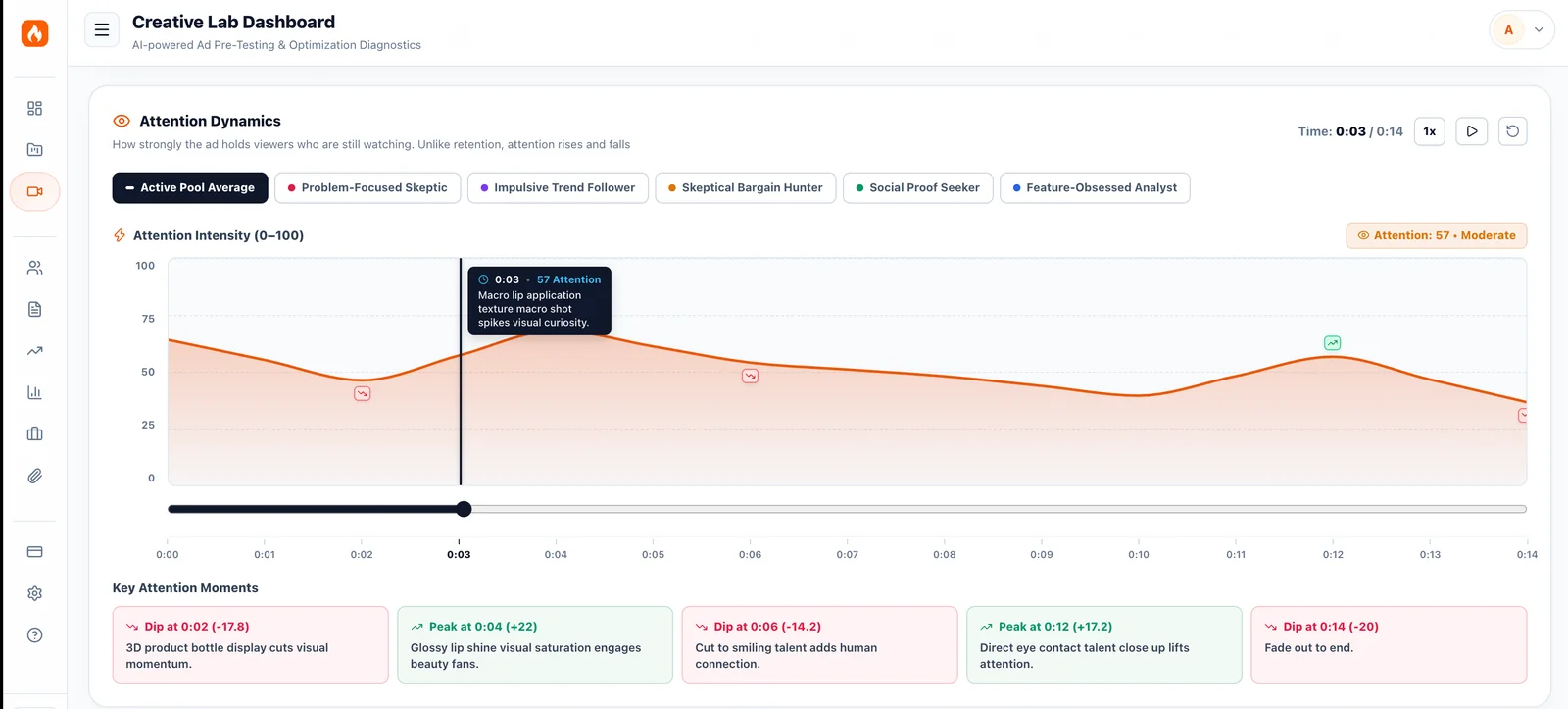
Attention over time. Retention shows how many people are still watching. Attention shows how strongly the ad holds the ones who are. AdFlame marks the peaks and dips, such as a close-up product shot that lifts attention or a slow scene that loses it.
What the buyers said. Each test splits the panel into buyer groups, such as the Problem-Focused Skeptic, the Impulse Trend Follower and the Skeptical Bargain Hunter, each with its own FlameScore. You can read what individual AI buyers said, when they left or kept watching, and a suggested angle for the next version.
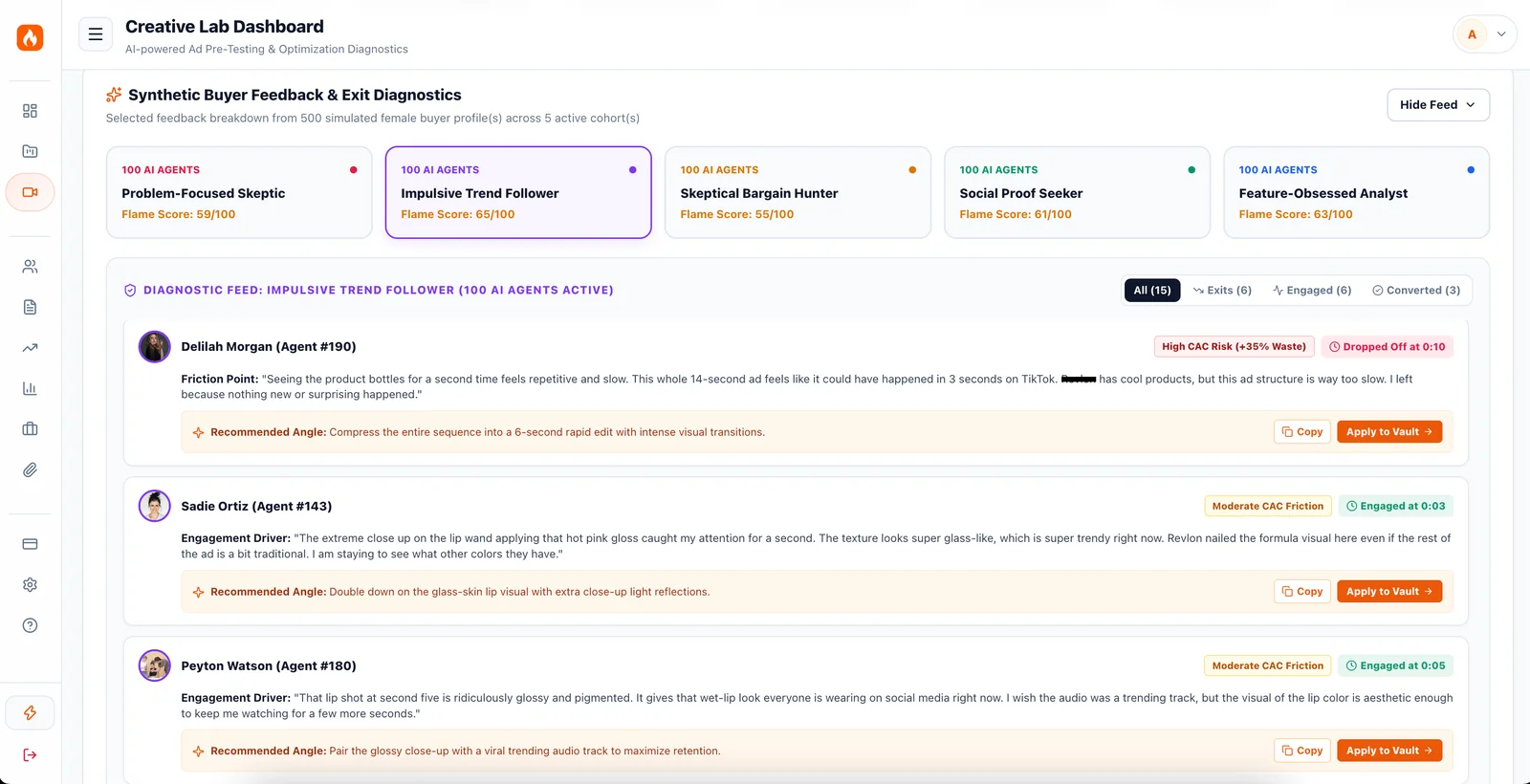
Script rewrites. AdFlame suggests new hooks and voiceover lines you can record. For example, it turns a product-first opening ("Check out our new organic greens powder…") into a problem-first one ("If you crash at 2 PM every day…").
Predicted metrics. The report includes a FlameScore, a predicted click-through rate and an estimated ROAS range, compared with benchmarks from more than 20 industries.
Hook rate and thumbstop rate
The hook rate is the share of people who keep watching an ad past the first 3 seconds. It is also called the thumbstop rate or thumbstop ratio, because it measures how often your ad stops someone from scrolling.
A low hook rate means most people never reached the part of the ad that sells.
How to calculate hook rate and hold rate
You can work out both from the columns in Meta Ads Manager:
- Hook rate = 3-second video plays ÷ impressions
- Hold rate = ThruPlays ÷ impressions
A ThruPlay counts when someone watches 15 seconds of your ad, or the whole ad if it is shorter. Hook rate tells you if the opening stops the scroll. Hold rate tells you if the rest of the ad keeps people watching.
For example, an ad with 10,000 impressions and 2,800 three-second plays has a 28% hook rate. If 900 of those viewers reach a ThruPlay, its hold rate is 9%. A strong hook with a weak hold usually means the opening works but the middle of the ad loses people.
Hook rate benchmarks
AdFlame publishes free hook rate benchmarks for 21 industries. According to its data:
- The median 3-second hook rate across industries is about 25%.
- By industry, the median ranges from about 22% to 29%.
- A hook rate of about 30% or more puts an ad in the top quarter.
- The top 10% of ads reach about 45%.
Medians for some of the industries:
| Industry | Median 3-second hook rate |
|---|---|
| Business services | 28.7% |
| Beauty and wellness | 28.1% |
| Sports and fitness | 26.9% |
| Food and dining | 26.1% |
| Ecommerce and retail | 25.4% |
| SaaS and software | 22.9% |
| Apparel and accessories | 22.9% |
| Consumer electronics | 22.2% |
These are AdFlame's own figures, based on public industry data and its estimates. Use them as a rough guide and compare them with your own account history.
In each test, AdFlame predicts how many viewers stay past the first 3 seconds and shows which frames or pacing choices lose them.
How to improve your hook rate
A few changes help most video ads hold more people in the first 3 seconds:
- Open with the problem, not the product. "If you crash at 2 PM every day…" holds better than "Check out our new greens powder…".
- Put text on screen in the first second. It gives sound-off viewers a reason to stay.
- Show movement or a cut early. A static first shot is easy to scroll past.
- Keep text inside the safe zone. A hook nobody can read does not work.
- Make it work with the sound off. Many people watch short-form video muted.
TikTok, Instagram and Reels safe zones
On TikTok, Instagram Reels and YouTube Shorts, the app places buttons, captions and the account name on top of your video. The like, comment and share buttons sit on the right, and the caption and username sit along the bottom. The area they leave clear is called the safe zone.
How much space to leave depends on the platform:
| Platform | Safe zone guidance | Where to check |
|---|---|---|
| Instagram and Facebook Reels ads | Meta recommends keeping about 14% clear at the top, 35% at the bottom and 6% on each side. On a 1080 × 1920 video, that is roughly 270 px at the top and 670 px at the bottom. | Meta's Ads Guide for Reels |
| TikTok ads | No single pixel spec, because the covered area changes with caption length and ad features. The right-hand buttons and the bottom caption area are the main risks. | TikTok's safe zone templates in Ads Manager |
| YouTube Shorts | Buttons on the right and the title and channel name along the bottom, similar to TikTok. | YouTube's Shorts guidance |
Layouts change when apps update, so check the platform's current template before you finalise a video.
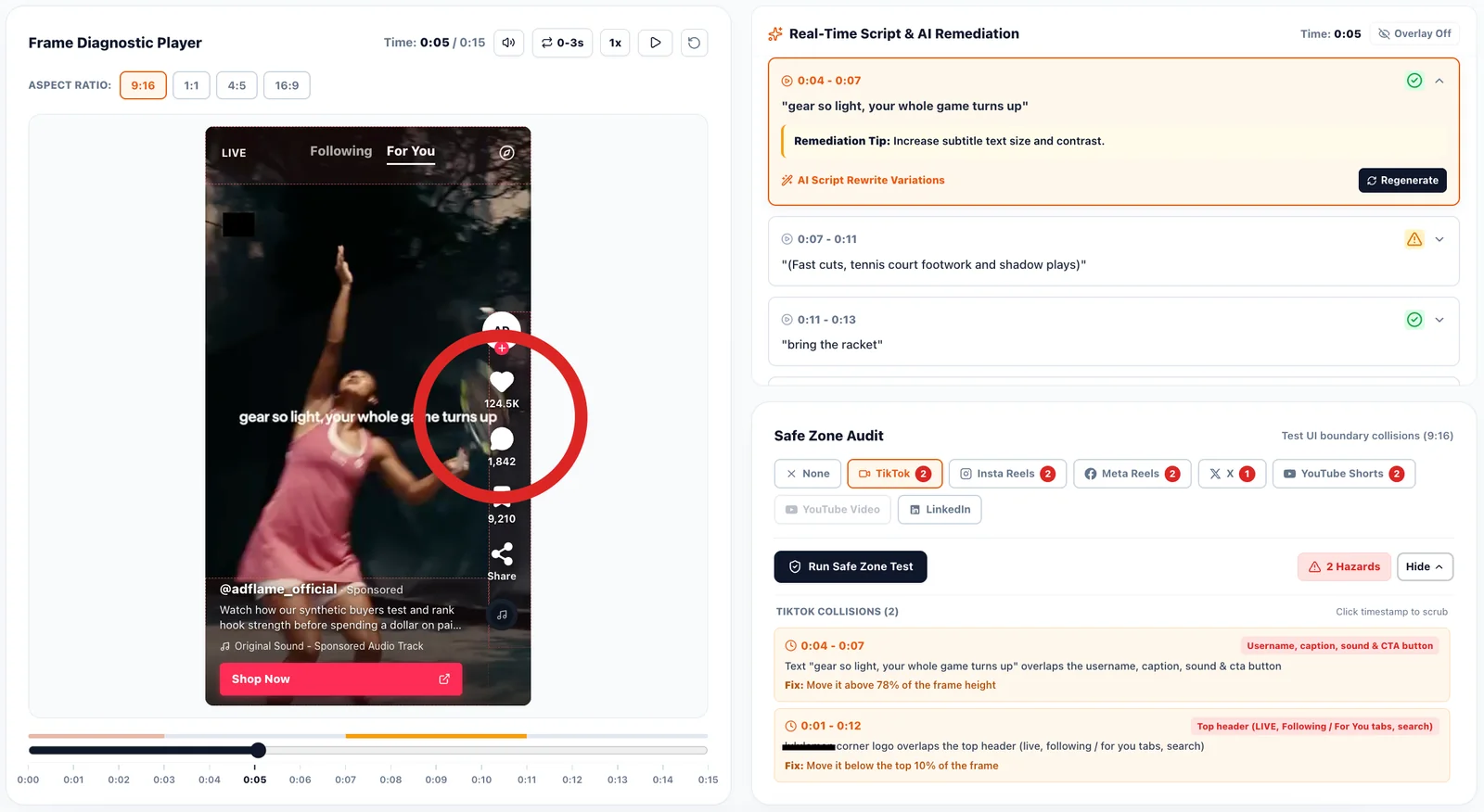
If your text, discount code or call to action falls outside the safe zone, viewers cannot read it. The mistake is easy to miss, because the video looks fine in your editor and only breaks inside the app.
AdFlame checks each video against where each app's interface actually sits. On Reels, for example, that is:
- The top bar: about the top 10% of the screen
- The account name, caption and call-to-action button: about the bottom 23%
- The like, comment and share buttons: about 12% on the right, from roughly halfway down
It runs the same check for TikTok, YouTube Shorts, X and LinkedIn, and for YouTube in-stream on 16:9 ads. Each clash is listed with the second it happens, what covers it and how to fix it, such as "move it above 78% of the frame height". It also checks sound-off readability, since many people watch short-form video with the sound off.
Creative fatigue and creative refresh
Even a winning ad stops working after a while. As the same people see it again and again, its click-through rate falls and its cost per result rises. This is called creative fatigue, or ad fatigue.
Watch for these signs:
| Sign | What it looks like | What to try |
|---|---|---|
| Frequency rising | The same people see the ad more and more often | Test new hooks or reach a new audience |
| CTR falling | Fewer clicks on an ad that used to perform | A new opening or a new angle |
| Cost per result rising | Each sale or lead costs more than before | Refresh the creative before you raise the budget |
| Hook rate falling | Fewer people stop in the first 3 seconds | A new first shot, first line or on-screen text |
The fix is a regular creative refresh: new hooks, new openings and new versions of the ads that work. That means a steady flow of new creatives, and each one needs testing.
This is where pre-testing helps most. Instead of spending live budget on every new version, you can test several hooks in AdFlame first and only launch the ones that hold attention.
How AdFlame fits with live testing
AdFlame does not replace live testing. Real buyers in a real auction are still the final test. What AdFlame changes is which ads you send into that test.
| Live testing in ad platforms | AdFlame pre-testing | |
|---|---|---|
| When you learn | After the ad has spent budget | Before launch |
| Time to results | Days, after the learning phase | About 2 minutes |
| What you learn | CTR, CPC and other totals | The second people drop off, why, and what to fix |
| Cost per test | Real ad spend | One credit, about $5 to $8 |
| Safe zone check | No | Yes |
| Final proof of performance | Yes | No, it is a prediction |
A simple workflow:
- Make three to five versions of a hook.
- Test them in AdFlame and fix the weak points.
- Launch the strongest versions in a live campaign.
- When an ad shows fatigue, test new hooks for it the same way.
AdFlame pricing
AdFlame is a monthly subscription, with 20% off for annual billing.
| Plan | Price | Tests per month | AI buyers per test | Highlights |
|---|---|---|---|---|
| Starter | $199 a month | 25 | 50 | Hook data, drop-off graphs, buyer feedback, script fixes, safe zone checks |
| Growth | $499 a month | 75 | 100 | Industry benchmarks, predicted CTR and ROAS, PDF reports, 5 team seats |
| Enterprise | $1,499 a month | 300 | 500 | Custom buyer groups, white-label reports, 20 team seats, priority queue |
That works out to about $8, $6.65 and $5 per video test. New accounts get 2 free test credits, with no credit card needed.
Before you buy
It predicts, it does not prove. AdFlame's buyers are AI, and its metrics are predictions. The site labels results such as a 3.4x hook lift as illustrative examples. Compare its predictions with your own live results for a few weeks before you rely on them.
It is built for short-form video. Each test covers one video of up to 60 seconds and 50 MB. Static images and long videos are not the focus.
It suits steady creative volume. The plans make most sense if you test new creatives every week. If you launch one ad a month, the free credits and the Starter plan may be enough.
Who it suits
If you are a media buyer or performance marketer, AdFlame shows why an ad might fail before it spends money, with a fix to try.
If you run a DTC brand, it helps you choose which creator videos and hooks to launch, and catches safe zone mistakes before they go live.
If you run an agency, the Growth and Enterprise plans add team seats and client-ready reports.
Questions people ask
What is ad creative testing?
Ad creative testing means comparing versions of an ad to find the one that performs best. It is usually done with live budget in ad platforms. AdFlame tests video ads before launch, with AI buyers.
What is a good hook rate?
According to AdFlame's benchmarks, the median 3-second hook rate is about 25%, ranging from about 22% to 29% by industry. About 30% or more puts an ad in the top quarter.
What is the difference between hook rate and thumbstop rate?
They usually mean the same thing: the share of impressions where people keep watching past the first 3 seconds.
How do I calculate hook rate?
Divide 3-second video plays by impressions. For example, 2,800 three-second plays from 10,000 impressions is a 28% hook rate.
What is hold rate?
Hold rate is ThruPlays divided by impressions. It shows how many people keep watching after the hook, up to 15 seconds or the end of a shorter ad.
What is the TikTok safe zone?
It is the part of the screen not covered by TikTok's buttons, caption and username. Keep key text and calls to action inside it. AdFlame checks this for you.
What is the Instagram Reels safe zone for ads?
Meta recommends keeping about 14% clear at the top, 35% at the bottom and 6% on each side of a Reels ad.
How do I know if my ad has creative fatigue?
Watch for a falling click-through rate and a rising cost per result on an ad that used to perform well, especially as frequency goes up. Refresh it with new hooks or versions.
Is AdFlame free?
New accounts get 2 free video tests, with no credit card. Paid plans start at $199 a month.
Verdict
Most creative testing happens after the money is spent. AdFlame moves part of it before launch. In about two minutes per video, it shows the second viewers drop off, what put them off, whether a button covers your text, and what to change.
Its numbers are predictions, so live results still have the final say. But for teams that make new video ads every week, it is a quick way to catch weak hooks and safe zone mistakes before they cost money. The 2 free tests are enough to try it on your next ad.
👉 Test your first video ad free on AdFlame
Browse more of our product reviews.
Want a review like this for your own product? Order a StartupBase review.
AI Tools
Marketing
Advertising


 Continue with Google