
To launch on StartupBase, prepare a sharp tagline, clear description, logo, and at least one strong screenshot, then submit. A Free launch goes live in about 4 to 6 weeks; the $39 Launch Now plan lets you launch today, guarantees a homepage feature, and includes a DR 72 dofollow backlink. Show up to reply on launch day and keep sharing the page.
Quick Answer
A StartupBase launch puts your product in front of founders and early adopters, earns you a spot on the homepage, and hands you a DR 72 dofollow backlink that keeps building your SEO long after launch day.
Getting there is not just filling out a form. A great launch comes down to a sharp tagline, a first screenshot that sells, the right launch date, and showing up when your product goes live.
This guide walks you through all of it: what you can win, what to prepare, how to submit, how the Free and $39 plans compare, how to optimize your page and cross promote it, and exactly what to do on launch day and the weeks after.
Still deciding where to launch? Start with Product Hunt vs StartupBase and our guide to the best Product Hunt alternatives. If StartupBase is already on your shortlist, keep reading.
Why launch on StartupBase
StartupBase is built for discovery that lasts, not a one day spike.
Every approved product gets a real launch spot. Once you are live, your product page keeps working through daily launches, weekly and monthly rankings, curated collections, topic pages, reviews, and the newsletter. Where most launch platforms give you a single day of attention, StartupBase keeps your product visible for months.
If you want the bigger picture of how StartupBase fits into a full launch stack, see 100+ places to launch, relaunch, and list your product.
What you can win with your launch
A StartupBase launch is more than a listing. Done well, it earns you visibility, social proof, and lasting SEO.
Homepage feature. Paid launches are guaranteed a spot on the homepage, in front of founders and early adopters who are actively browsing new products.
Rankings and badges. Products compete on daily, weekly, monthly, and yearly rankings. Top products earn ranking badges you can display on your site and share on social, and they keep showing up on the "Best of StartupBase" pages long after launch day.
Reviews and comments. The community can review and comment on your product. Reviews become social proof you can point new visitors to, and comments give you real feedback from other builders.
A verified badge. Verifying your product earns a verified badge and priority review, which builds trust and gets you published faster. See verified launches on StartupBase.
Newsletter exposure. Featured products can reach the StartupBase newsletter and its 14,300+ subscribers, well after launch day is over.
A dofollow backlink. The $39 plan includes a DR 72 dofollow backlink to your site, which we cover next.
Launching on StartupBase is also an SEO play
Founders often think of a launch as a traffic spike. It is also a chance to build authority.
The $39 Launch Now plan includes a permanent DR 72 dofollow backlink to your site. For a newer domain, a dofollow link from a trusted, relevant site is one of the simplest ways to start building ranking signals, and it keeps working long after launch day.
Go with the Ultimate tier and you also get an editorial review published on the StartupBase blog, written to rank for people searching "[your product] review." That is a second indexed page and a second backlink pointing at your product.
Pair that with listings on other relevant startup directories and you have a real, compounding SEO footprint, not just a one day mention.
What to prepare before you submit
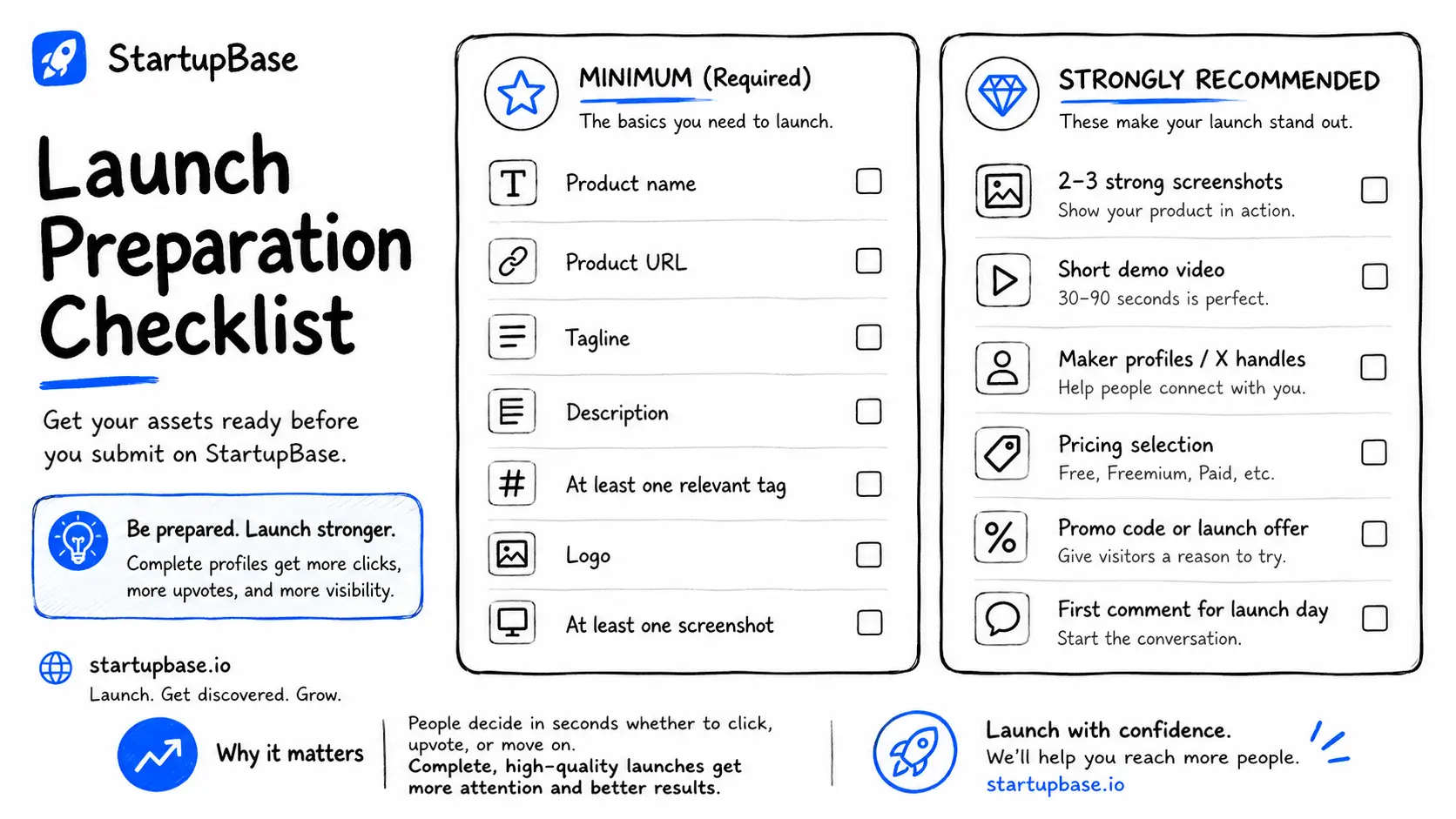
Do not open the submission form until your assets are ready. It is much faster to launch when you are not hunting for a logo file halfway through.
Here is the minimum you need:
- Product name
- Product URL
- Tagline (one sentence)
- Description
- At least one tag
- Logo
- At least one screenshot
And here is what separates a strong listing from a forgettable one:
- Two or three screenshots that show the product doing its job, not just empty UI
- A short demo video or GIF
- Maker profiles or X handles
- Pricing (Free, Freemium, or Paid)
- A promo code or launch offer
- A first comment, written in advance, that explains the story
The strongest listings feel finished. People decide in seconds whether to click, upvote, or scroll past.
One thing to get right before anything else: your tagline.
A vague tagline sinks good products.
The future of productivity.
That says nothing. Compare it to:
Turn your weekly standup notes into a shareable status report in one click.
The second one tells a visitor what it does and who it is for, in a breath. Write that version before you submit.
How to submit your product on StartupBase
Once your assets are ready, submitting is quick.
Step 1: Start your submission
Go to the submit page and enter your product name and website URL.
StartupBase uses an AI Launch Assistant to pull in initial details and speed up setup. Shipping a major update instead of a brand new product? Use the "Launching again?" flow to relaunch an existing product rather than starting from scratch.
Get the product name and canonical URL right here, because everything else builds on them.
Step 2: Build the listing
After setup, StartupBase walks you through the listing builder in a few clean sections.
General. The core story: name, tagline, website, extra links, X handle, description, tags, and location. Your description should say who it is for, what problem it solves, and why anyone should care. Markdown is supported, so format it instead of posting a wall of text.
Media. This carries more weight than founders expect. Add a logo, several screenshots, and a demo video. Your first screenshot becomes the social preview image when your page is shared, so it sells on StartupBase and shapes how your launch looks on X, LinkedIn, and Slack.
Makers. People trust products with visible humans behind them. Add makers by StartupBase username or X handle.
Extras. Where you nudge conversion: a promo code, a promo label, and your pricing type. Running a launch deal? Put it here. Free or freemium? Say so plainly.
Launch checklist. Before you continue, StartupBase shows a checklist covering the essentials: name, URL, tagline, description, tags, logo, and at least one screenshot. Add your first comment now too.
Step 3: Choose how you launch
Once the listing is ready, you pick your launch plan.
Free vs Launch Now: which plan to choose
Both get you a real launch. They differ on timing, visibility, and whether you get a backlink.
| Free | Launch Now ($39) | |
|---|---|---|
| Price | Free | $39 one time |
| Timing | Live in about 4 to 6 weeks | Launch today or schedule, up to 30 days ahead |
| Homepage feature | Basic visibility | Guaranteed |
| Backlink | Not included | DR 72 dofollow backlink |
| Badge on your site | Required | Not required |
Free is a good fit if you are patient and timing does not matter. You add a StartupBase badge to your site, join the priority free queue, and go live in roughly four to six weeks.
Launch Now ($39) is for founders who want control and an SEO boost. You choose your date (or launch the same day), skip the wait, land on the homepage, drop the badge requirement, and get a DR 72 dofollow backlink to your site. For most founders coordinating a launch with an email or social push, that is the easy choice.
Want more than a homepage feature? Paid Boost, Grow, and Ultimate tiers add longer homepage placement (30, 60, and 90 days), a feature in the StartupBase newsletter (14,300+ subscribers), and, on Ultimate, a 1,000+ word editorial review of your product published on the blog and optimized to rank for your "[product] review" searches, with an extra backlink. Handy if SEO and long term discovery are the priority.
Optimize your product page
Your product page is the first thing people see, so make it earn the click. A few things move the needle most.
Lead with what it does. Your tagline and the first line of your description should name the problem and the outcome, not list features.
Make the first screenshot sell. It doubles as your social preview image, so put your strongest "here is the value" shot first. Show the outcome, not an empty dashboard or a login screen.
Add a deal. A promo code or launch offer gives people a reason to click now and try the product, and it makes your listing stand out in the rankings.
Add the StartupBase badge to your site. It builds trust, signals your launch to your own visitors, and sends them to your page to vote. It is also required for a free launch.
Add your makers. Visible founders build trust. Add makers by StartupBase username or X handle.
Write your first comment in advance. Use it to explain why you built the product, what is new, or the exact feedback you want. It sets the tone for the whole discussion.
Cross promote your launch
Do not rely on StartupBase traffic alone. The launches that rank are the ones founders turn into an event.
On and around launch day, share your product page on:
- X, with a short build story or demo
- LinkedIn, especially for B2B products
- Relevant subreddits and Discord or Slack communities (follow their rules)
- Indie Hackers, with a founder story or lesson
- Your email list and existing users
Then keep going after day one. Submit to other relevant startup directories and work through our 100+ places to launch list so discovery keeps compounding.
Your StartupBase launch day playbook
A launch is a short sequence, not a single click.
The week before. Finalize your positioning, screenshots, and demo. Write your first comment. Tell your email list and close network what is coming and when.
The day before. Confirm your assets look right on the live preview. Line up the people who said they would support you. Draft your launch day social posts.
Launch day. Be present. Reply to every comment quickly, thank supporters, and answer questions. Early engagement is what StartupBase uses to rank launches, so the first few hours matter most.
The week after. Keep sharing the page and turn the launch into content: what you shipped, what people asked, what surprised you. For a full breakdown of turning launch traffic into real users, read how to get your first 100 users after launch.
After you launch: keep the momentum
Your launch does not end on day one. StartupBase keeps your product working through public product pages, topic and discovery pages, launch archives, and the weekly, monthly, and yearly "Best of StartupBase" rankings.
A few things worth doing in the weeks after:
Ask happy users for a review. Reviews add social proof to your page and give new visitors a reason to trust the product. A short, direct ask usually does it.
Keep engaging. Reply to new comments and questions. Active pages stay visible, and strong engagement helps you climb the rankings.
Relaunch on your next big update. A major feature, a redesign, or a new use case is a reason to go back to the market. StartupBase has a relaunch flow built for exactly this.
Common StartupBase launch mistakes to avoid
Most quiet launches fail for the same handful of reasons.
- A vague tagline. "AI powered platform for teams" tells no one anything. Be specific.
- A weak first screenshot. Empty dashboards and login screens do not sell. Show the outcome.
- No first comment. Silence on your own launch reads as low effort. Write it in advance.
- Launching and disappearing. If you are not there to reply, engagement stalls fast.
- No audience warm up. Springing the launch on a cold network gets you a quiet launch.
- Treating it as one day. The founders who win keep sharing the page, ask for reviews, and relaunch on every meaningful update.
Avoid those and you are already ahead of most launches.
Your StartupBase launch checklist
Save this and tick it off as you go.
A week before
- Finalize your tagline, description, and tags
- Prepare your logo and two to three outcome focused screenshots
- Record a short demo video or GIF
- Write your first comment
- Tell your email list and network the launch date
The day before
- Check your listing on the live preview
- Add the StartupBase badge to your site
- Set up a promo code or launch deal
- Confirm the supporters who plan to show up
- Draft your launch day social posts
Launch day
- Publish, or confirm your scheduled launch
- Post on X, LinkedIn, and any relevant communities
- Reply to every comment and thank supporters
- Keep sending your own audience to the page
After launch
- Ask happy users for a review
- Turn the launch into content
- Submit to other relevant startup directories
- Relaunch on your next meaningful update
FAQs
Is a paid plan required to launch on StartupBase?
No. StartupBase has a free launch path. The $39 Launch Now plan is optional and adds timing control, a guaranteed homepage feature, and a DR 72 dofollow backlink.
What is the difference between Free and Launch Now?
Free goes into the priority queue (with a badge on your site) and goes live in about four to six weeks. Launch Now ($39) lets you launch today or schedule it, guarantees a homepage feature, drops the badge requirement, and includes a dofollow backlink.
How long does a free launch take?
Roughly four to six weeks in the queue. If you want to launch sooner, the $39 Launch Now plan skips the wait entirely.
How do I earn a badge on StartupBase?
Top products on the daily, weekly, monthly, and yearly rankings earn ranking badges you can display on your site and share on social. You can also verify your product to get a verified badge and priority review.
Can people review and comment on my product?
Yes. The community can leave reviews and comments on your product page. Reviews become social proof and comments give you real feedback, so ask happy users to leave a review after launch.
Do I get a backlink from StartupBase?
Yes. The $39 Launch Now plan includes a permanent DR 72 dofollow backlink to your site. The Ultimate tier adds a second backlink from an editorial review published on the blog.
Can I choose my launch date?
Yes, on any paid plan. Launches can be scheduled up to 30 days ahead, and you can move the date later if needed.
What do I need before I can launch?
At minimum: product name, URL, tagline, description, at least one tag, a logo, and at least one screenshot.
Can I relaunch an existing product?
Yes. StartupBase has a relaunch flow for publishing a major update or relaunching an existing product.
Which plan is best for SEO?
The $39 Launch Now plan already gives you a DR 72 dofollow backlink. If SEO is your main goal, the Ultimate tier adds an editorial review that ranks for your "[product] review" searches, plus an extra backlink.
Final thoughts
A strong StartupBase launch is not about hacks. It comes down to clarity, completeness, and timing.
If your page explains the product in one line, looks credible, shows real screenshots, and has a founder who actually engages when it goes live, you are already ahead of most launches. And with the $39 plan, you walk away with a DR 72 backlink that keeps working for you.
Ready to go?
Startup Launch
Startup Marketing
Founder Guide
StartupBase







 Continue with Google