
Anyvids is an all in one AI video and image platform that brings models including Seedance, Kling, Veo, Runway, Wan, Flux and Nano Banana into one workspace. Rather than selling access to those models, it packages them into around twenty named tools, with a Commerce Studio covering virtual try-on, AI product photos, AI product videos and relighting. This review covers what those tools do, how the credit pricing works on monthly and yearly billing, and who the product suits.
Quick Answer
For about a year, the pitch for an AI video tool was the list of models it could reach. That was a real advantage for a while, and it has stopped being one. The companies building these models release within weeks of one another and sell access to anyone who asks, so a list of logos now tells you very little about the company showing it to you.
Which leaves a harder question for anyone building on top of them. If access is not the product, what is?

Anyvids has answered it by counting jobs rather than models. There are around twenty named tools on the site, and most of them are not a generator with different settings. They are a specific piece of work someone actually needs doing, with the model choice already made.
This review is based on the public site. We did not generate anything on the platform, so nothing here is a judgement about how good the results look. It is about what the product is built to do and who it is built for.
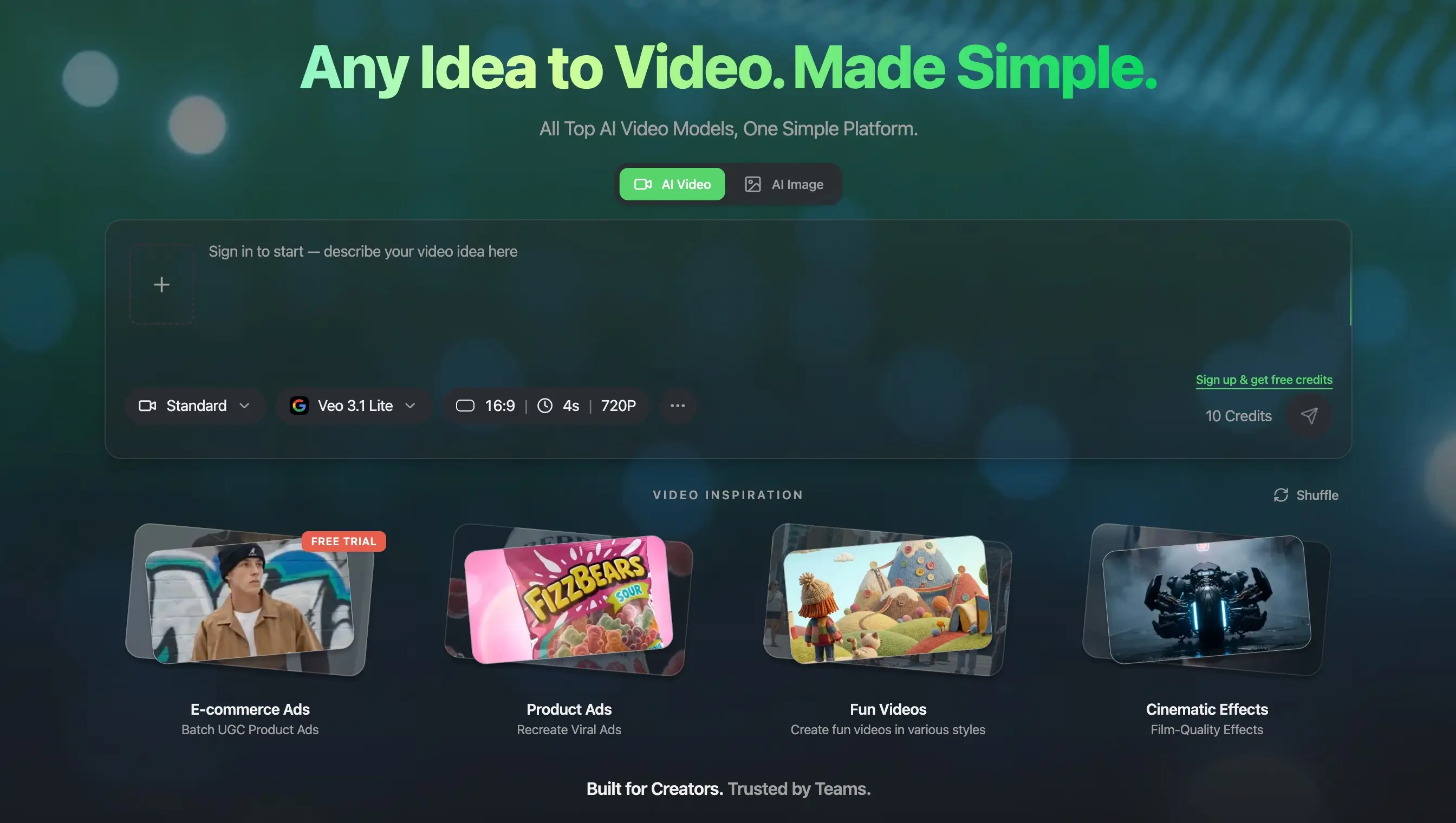
Twenty jobs, not one prompt box
Open the tools menu and you get a list that reads like a job sheet rather than a feature list: virtual try-on for photo, virtual try-on for video, product photography, product video, relighting, commercial posters, ad generator, avatar, character swap, motion control, video upscaler, image editor, animation, movie maker.
The distinction matters more than it sounds. A prompt box asks you to know what you want and how to describe it. A named tool has already decided most of that for you. The person who needs a product shot on a white background does not want to learn which model handles reflections best. They want the shot.
That is a real position, and it is the opposite of the general approach most tools in this category take. It also carries an obvious risk, which is that twenty shallow tools are worse than three good ones. Nothing on a marketing site can tell you which of those you are getting, and it is the first thing we would test with the free credits.
Commerce Studio is the actual bet
The clearest expression of that thinking is Commerce Studio, and it is where the product stops being general and picks a customer.
It gathers six things aimed squarely at people selling physical goods. Virtual try-on in both photo and video, from a product reference and a model reference. AI product photography with scene templates. AI product videos built from a still. A relighting studio with three dimensional light controls and studio presets. And a library of commercial poster layouts.
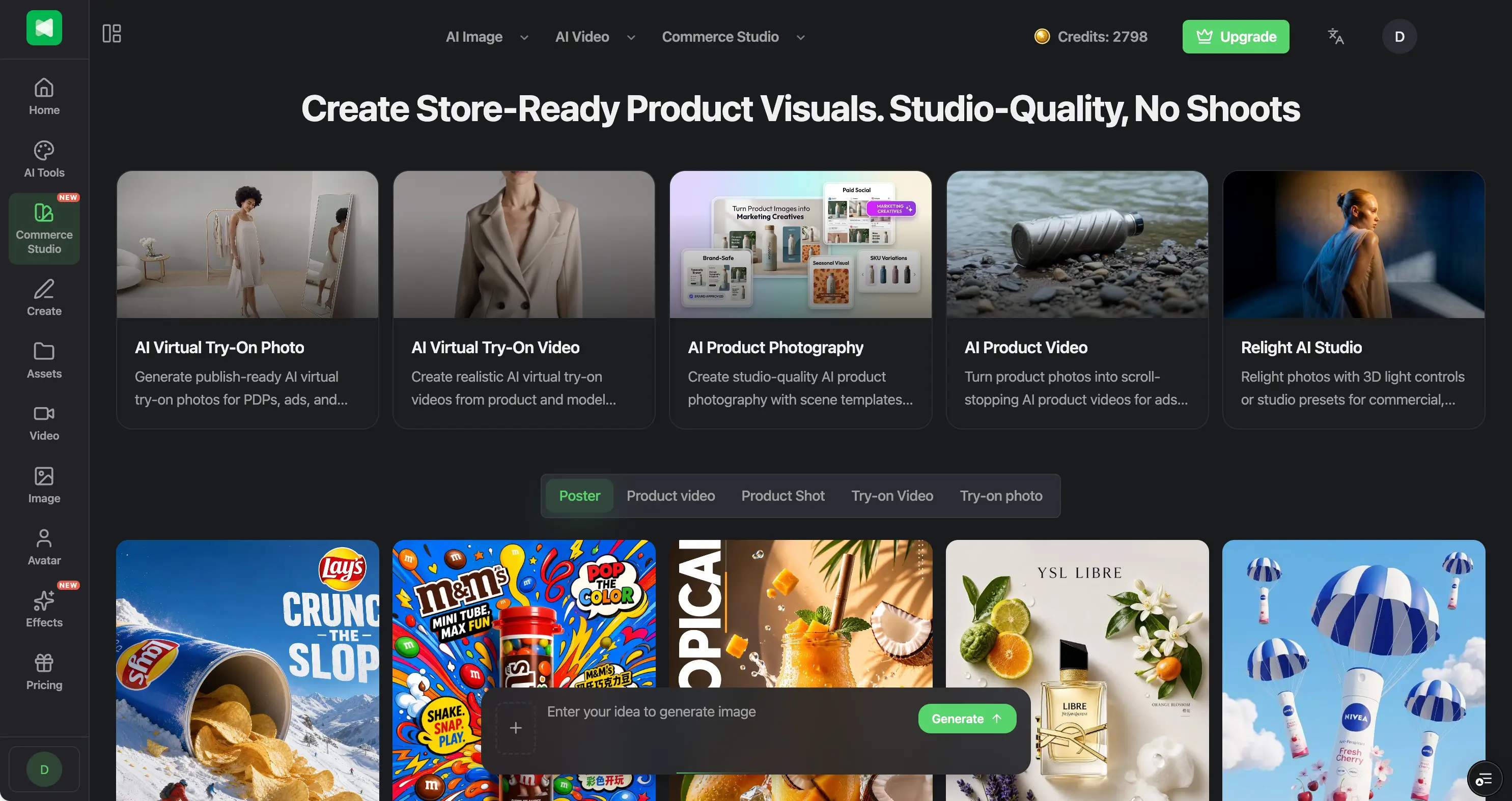
Read that list as an ecommerce operator rather than a creator and it makes complete sense. Those are the assets a product listing needs, in the order you need them, and they are the ones that normally require booking a studio, a photographer and a model, then waiting a week for retouching. Try-on video in particular is the kind of thing that was simply not available to a small brand at any sensible price two years ago.
It is worth saying plainly what this is and is not. It speeds up and cheapens a particular kind of production work, and for a small brand shooting a new range that is a genuine change in what is possible. It is not a replacement for a photographer or a designer on work where the craft is the point, and Anyvids does not claim otherwise.
Marketing Studio, and the same idea applied again
The newest part of the product is Marketing Studio, and it is the clearest example of the pattern in this whole review.
It contains three live tools. Design My Avatar builds a character with a drag and drop editor. Talking Avatar turns a still into a lip synced spokesperson. Motion Control drives that character using movement from a reference clip. An AI UGC generator is listed as coming soon.
The part worth noticing is not the tools, it is the templates sitting next to them. Marketing Video offers Tutorial, Problem and Solution, and Product Launch. Social Media offers UGC Ads, Unboxing, and Before and After. Every one of those is a format with a known structure that performs a known job, and you start from it with one click rather than describing it from scratch.
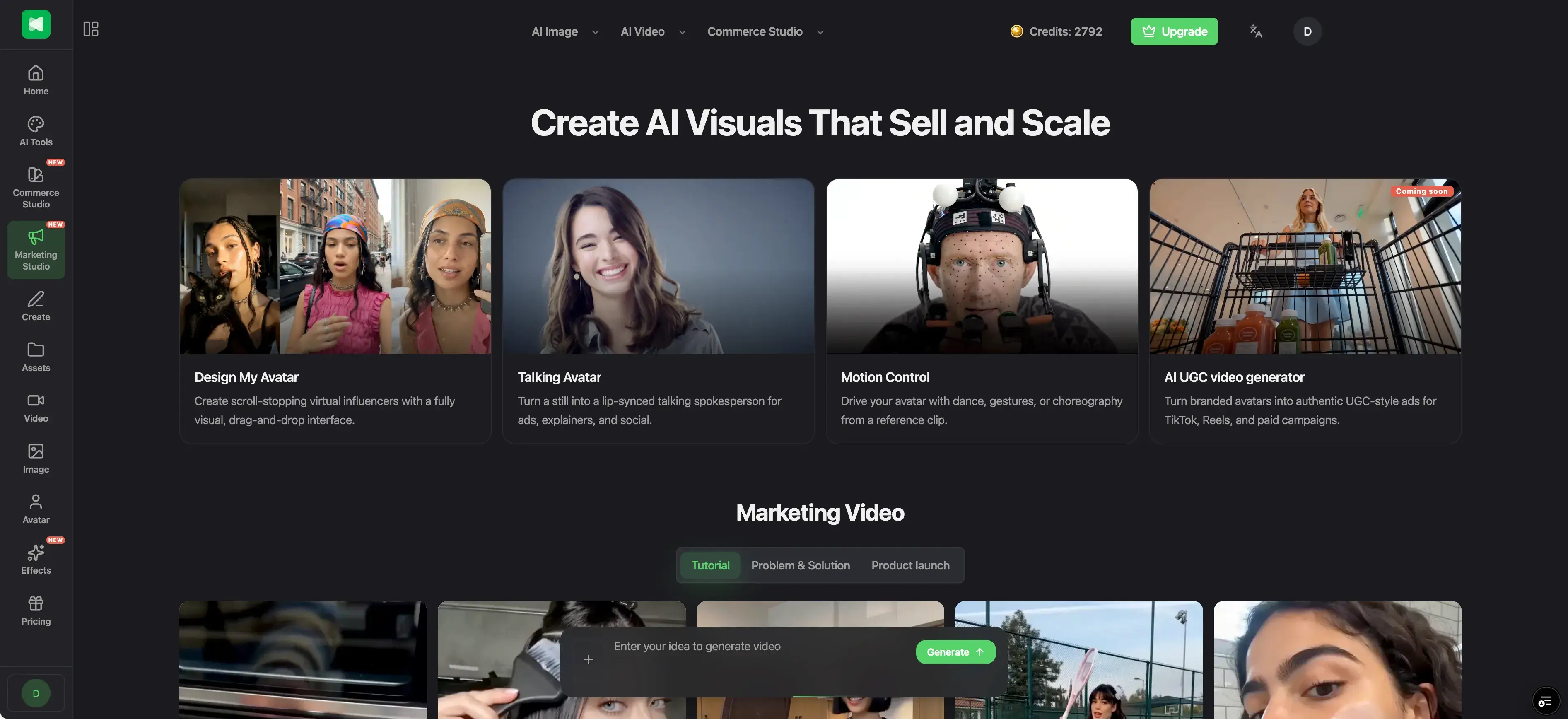
That is the same bet as Commerce Studio, made twice. Not a better generator, a shorter distance between wanting a thing and having it.
The AI Influencer Studio extends this into building a consistent recurring character across clips and stills, which is genuinely hard to do by prompting and is the difference between one good video and a campaign.
There is also an image editor that takes instructions in plain language, so background replacement, colour changes and relighting happen by describing them. It also does text translation across fourteen languages, which is the least glamorous thing on the site and possibly the most useful, because anyone running one campaign across several markets currently rebuilds every creative by hand.
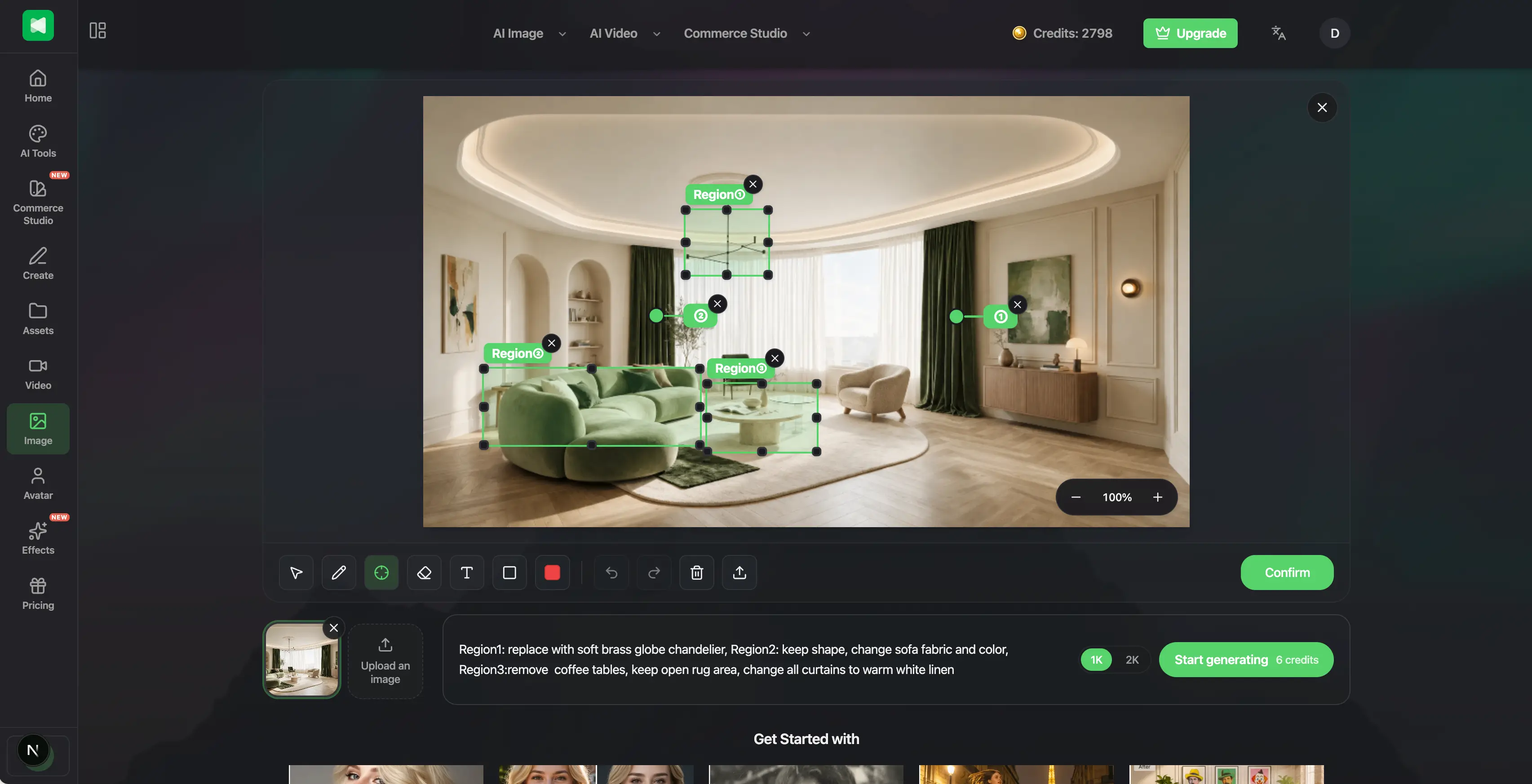
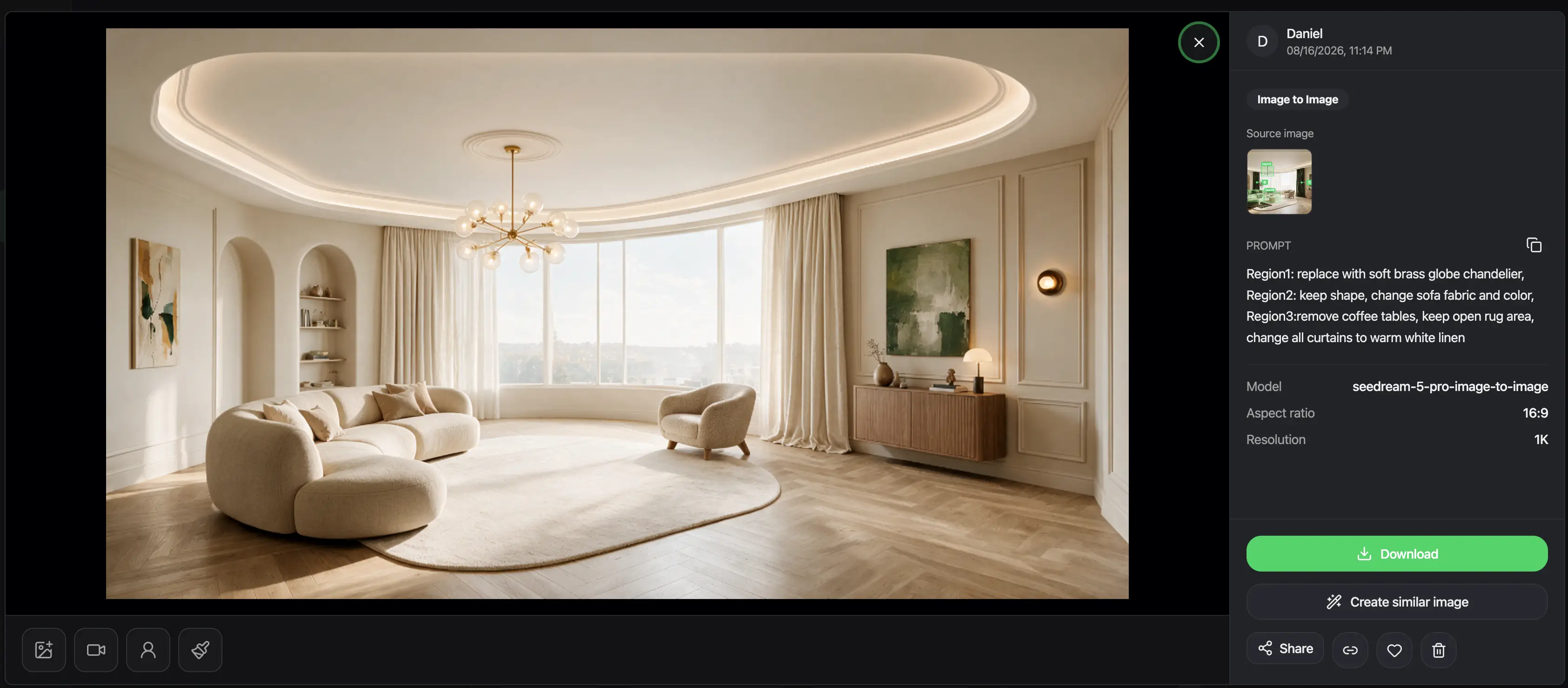
One honest note, because it sits at the centre of this section. Their own page describes turning branded avatars into "authentic UGC-style ads." User generated content means content made by actual users, so an avatar you designed producing an ad is neither user generated nor authentic, whatever else it is. That is a wording problem rather than a product problem, and the product is fine: a brand making its own creative with its own character is legitimate, cheaper than a shoot, and nobody is deceived when the character is obviously the brand's own.
Where it needs care is the influencer side, where the pitch involves brand deals and paid placement. If a synthetic persona endorses a product, the disclosure obligations that apply to human endorsers still apply, and they fall on you rather than on the tool. Worth knowing before you build a campaign on it.
What it costs
Pricing comes in three tiers, billed either monthly or yearly.
| Lite | Pro | Premium | |
|---|---|---|---|
| Per month | $15.00 | $45.90 | $119.90 |
| Per year | $120.00 | $275.40 | $1,199.00 |
| Twelve months at the monthly rate | $180.00 | $550.80 | $1,438.80 |
| Credits, monthly plan | 300 a month | 1,500 a month | 5,000 a month |
| Credits, yearly plan | 3,600 upfront | 18,000 upfront | 60,000 upfront |
| Videos a month, by their estimate | around 30 | around 150 | around 500 |
| Images a month, by their estimate | around 150 | around 750 | around 2,500 |
| Model access | limited selection | all models | all models |
| Jobs at once | 1 | 3 | 6 |
| Commercial licence | Included | Included | Included |
| Watermark | None | None | None |
Three things are worth knowing before you pick a tier.
Paying yearly is meaningfully cheaper rather than nominally cheaper. Lite drops about a third against twelve months of monthly billing, and Pro was running at half price when we looked. The yearly plans also hand you the whole year of credits at once rather than metering them out monthly, which suits campaign work where you shoot a range in a fortnight and then go quiet.
The per asset cost falls as you go up. At the Lite rate a video works out around fifty cents, at Pro around thirty, and at Premium around twenty five. Extra credits are sold in packs from $30 for 600, which matches the Lite rate, and Pro and Premium members get those packs at a discount. So the tier that looks expensive is the cheaper one per finished asset, provided you actually use the volume.
Lite does not include every model. Access to the full set starts at Pro. If a specific model is the reason you are signing up, the cheapest tier is not the one you want, and that is easy to miss because the logos on the Lite card look similar at a glance.
One small thing, since the page is built around the promise of pricing you can trust, and that promise is otherwise well kept: the credit cost of each generation is shown before you commit, usage history is visible, and the refund terms are stated rather than buried. When we looked, the yearly view was still carrying a sale banner with an end date that had already passed. A countdown that has expired undercuts the argument the rest of the page is making, and it is a five minute fix.
Who it suits
The sharpest fit is a small ecommerce brand or the person running creative for one. If your week involves product shots, listing images, short ad clips and the same campaign adapted for three markets, this is built around your actual calendar rather than around a general idea of creativity.
Agencies and social teams working across several clients are the next best fit, mostly because of the volume the higher tiers allow and the number of concurrent jobs.
It suits you less if you are a single creator making one or two things a month. Monthly billing means you can start small, but the cost per finished asset is highest at the bottom tier, so light use is the least efficient way to buy it. It suits you less, too, if you want fine control over a specific model, because the packaging that makes the tools fast is the same packaging that puts distance between you and the settings. If model choice is the point for you, our review of VioEvo covers a platform in the same category that puts that decision on the page every time you generate.
And if the work you are doing is the kind where the craft is the product, this is an accelerator for the routine parts rather than a substitute for the person doing it.
Questions people ask
What is Anyvids?
An all in one AI video and image platform that brings several leading models into one workspace, including Seedance, Kling, Veo, Runway, Wan, Flux and Nano Banana, and packages them into around twenty tools for specific jobs rather than a single prompt box.
What is Commerce Studio?
The part aimed at people selling products. It covers virtual try-on for photo and video, AI product photography with scene templates, AI product videos made from a still, a relighting studio, and a library of commercial poster layouts, so the assets a listing needs can be made in one place.
How does the credit pricing work?
Every generation costs a set number of credits, shown before you run it. On monthly billing you get 300, 1,500 or 5,000 credits a month depending on tier. On yearly billing the same allowance arrives as one lump at the start, so 3,600, 18,000 or 60,000. Extra credits come in packs from $30 for 600, and unused credit behaviour is set out in their credits FAQ.
Can I use the output commercially?
All three plans include a commercial licence and remove watermarks. As with any tool of this kind that covers the platform's own terms, so anything involving recognisable people, trademarks or another brand's assets still needs the usual checks, and try-on work in particular means having the rights to the model images you upload.
Is it better than using one model directly?
It depends on what you are doing. Going direct to a single provider gives you more control and usually costs less if you only ever need that one model. A platform like this is worth paying for when you want several models available and, more importantly here, when you want the job already assembled rather than built from parts each time.
Verdict
The headline claim, every top model in one place, is the least interesting thing about Anyvids, because it is now the baseline for the whole category rather than a reason to choose anything.
The interesting decision is underneath it. Rather than building a better general tool, Anyvids has spent its effort turning models into finished jobs and pointed most of them at people selling products. Commerce Studio is a clear bet on a specific customer, and the translation feature in the image editor suggests somebody there has watched a marketing team actually work.
Whether the individual tools hold up is something you will have to establish with your own product photos, and a month on the lowest tier is a cheap way to find out before committing to a year. The strategy, though, is the right one for where this category has got to.
Want a review like this for your own product? Order a StartupBase review.
Ecommerce







 Continue with Google