

EverStamp is a timestamp camera app for iPhone and Android. It puts the date, time and place in every photo and video frame, keeps captures together as one file, and has an independent trust service approved under EU rules timestamp it. This review covers how it works, what the timestamp proves and what it does not, how the other side checks a file, when to use it, how it compares to other timestamp camera apps, and pricing.
Quick Answer
You hand back a rental car, and two weeks later a charge arrives for a scratch you are sure was already there. You took photos at pick-up. The hard part is showing when you took them. The date on a phone photo comes from the phone, and a free app can change it. The other side can say your photos were taken later, and it becomes your word against theirs.
The same thing happens with a deposit after you move out, with cracks after building work next door, and with work that gets covered up, such as pipes before a wall is closed.
EverStamp is a timestamp camera built to prevent those disputes. It puts the date, time and place in every photo and in every frame of a video, keeps the captures together as one file, and has an independent trust service, approved under EU rules, add a timestamp to that file. Anyone you send it to can check, in a browser and without an account, when the file was sealed and whether anything has changed since.
This review is based on the EverStamp website, its documentation and its pricing page. We have not used the app in a real dispute.
Why the date on a photo is not enough
Most timestamp camera apps write the date and time onto the photo when you take it. That makes the date easy to read, but not reliable. The time comes from the phone's clock, which the user can change, and the date stored in a photo file can be edited afterwards. There are apps that do it in a few taps.
Even when nobody has changed anything, the other side has no way to check. A folder of loose photos also cannot show whether one was removed or added later.
That is where these disputes often get stuck. Nobody argues about what the photo shows. They argue about when it was taken and whether it has changed. EverStamp is built to answer those two questions.
How EverStamp works
Every file goes through the same four steps.
1. Take the photos. The app's camera adds a bar to the image with the date, the time to the second, the address and the GPS coordinates. On a video, the bar is in every frame. Because it is part of the image, it is still there on a printout or a screenshot. The app works without a signal, and each photo gets a digital signature on the phone the moment you take it, so a later edit can be detected.
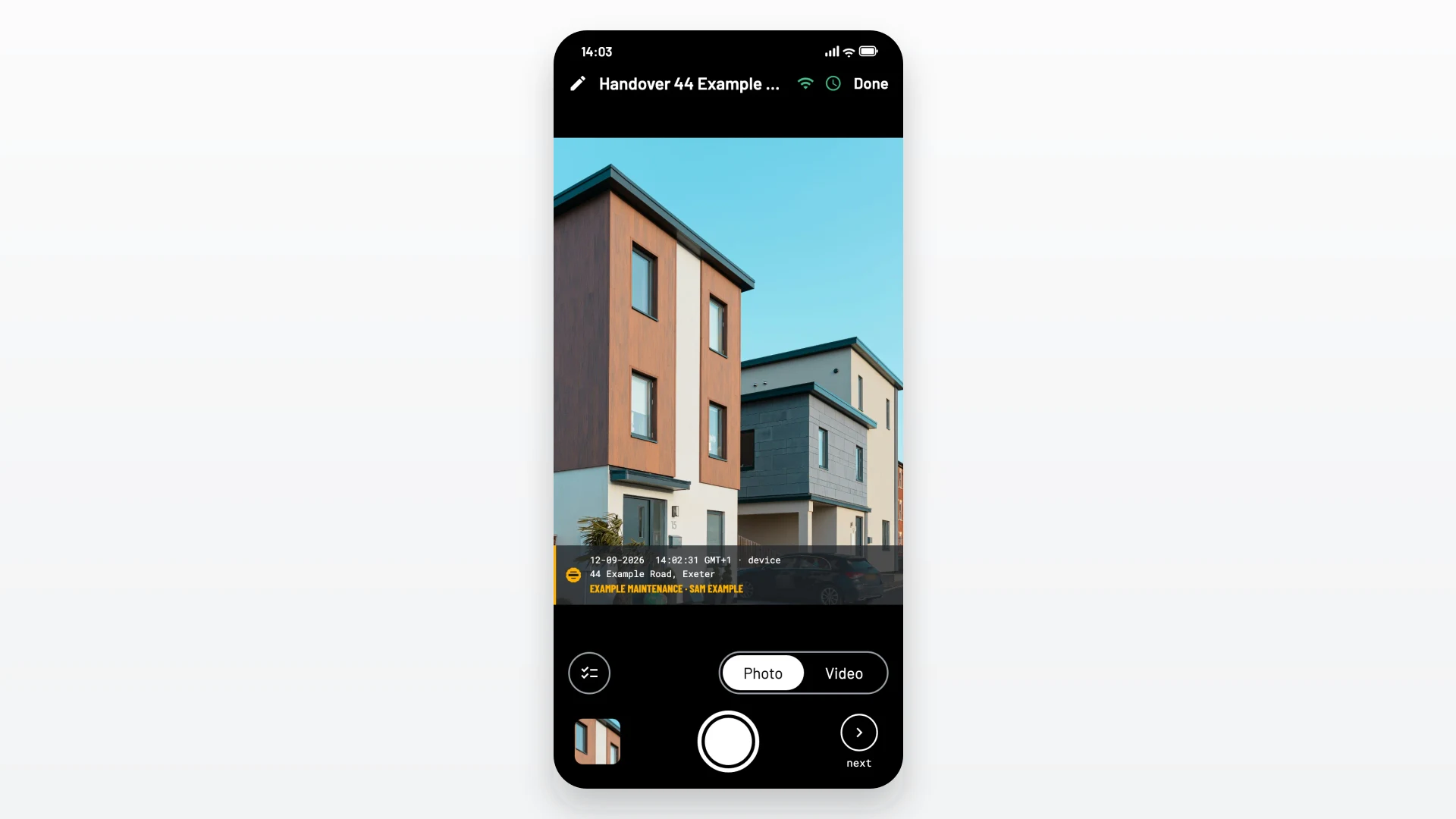
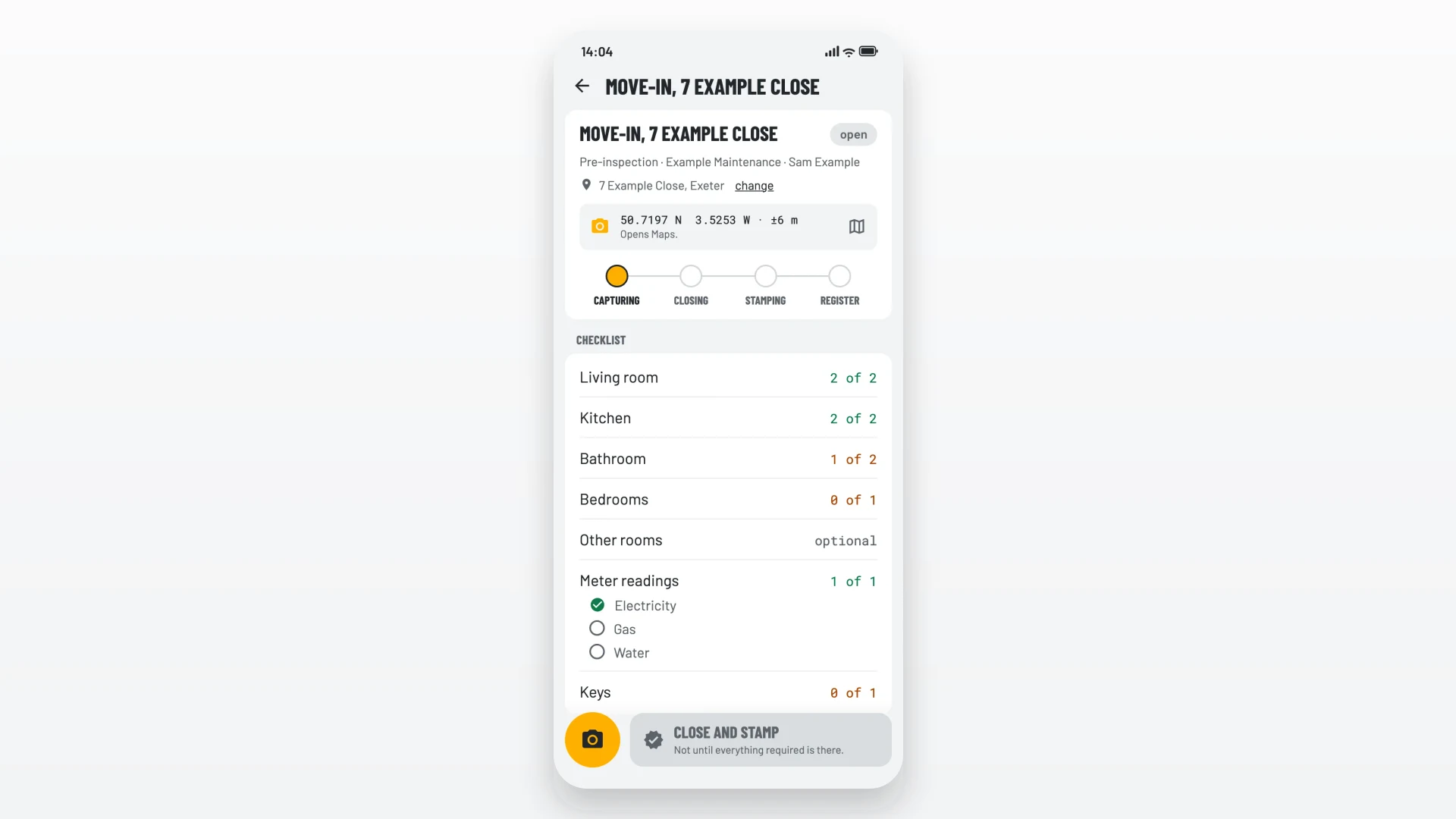
2. Follow the checklist. The app has ready-made checklists for common moments, such as a rented home, a car and a handover. Each step asks for a minimum number of photos and, where it helps, a field: a licence plate, a meter reading or a serial number. The app can read the plate or the meter through the camera and fill in the value for you to confirm. The checklist shows what is still missing, so you do not leave out the one room that matters later.
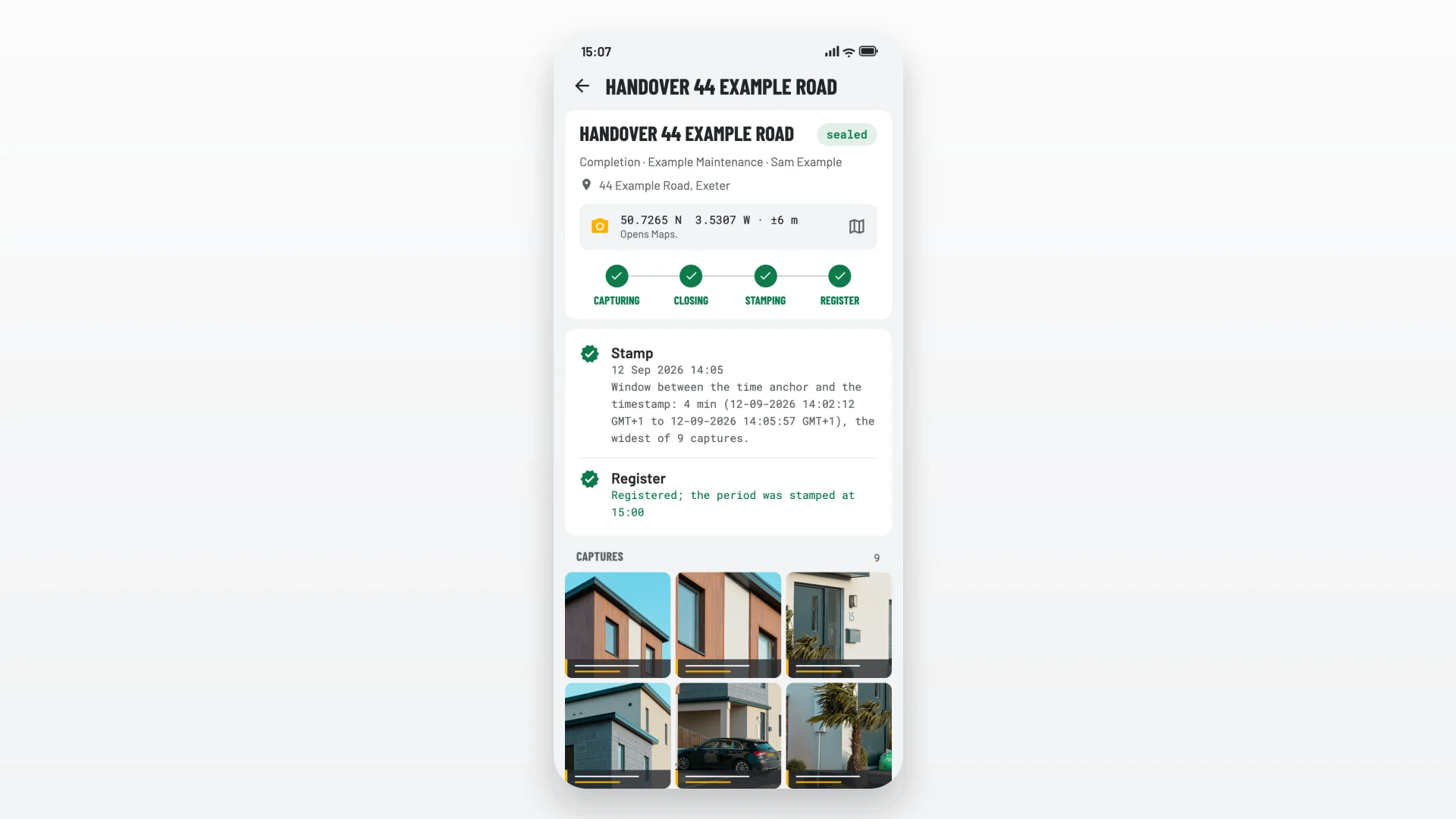
3. Seal the file. When you close the file, an independent timestamp service, approved under EU rules, stamps the whole file using its own clock. From then on, any change to the images, or to their order, shows up. If you remove a photo, the file keeps a visible note that something was removed, with your reason.
4. Share it. You send a PDF report with the photos, the file number and a QR code, the full archive, or a share link. The person receiving it checks it at everstamp.app/verify.
Content Credentials on every photo
The stamp bar you can see is only part of what EverStamp records. Every photo also carries a Content Credential: a signed record of where the image came from, written in C2PA, the open provenance standard. C2PA is backed by Adobe, Google, Microsoft, the BBC and others, and it is used by cameras like the Leica M11-P and tools like Adobe Photoshop.
Two signatures sit under each photo: the phone signs the photo with its own device key as you take it, and EverStamp signs the Content Credential with EverStamp's own certificate.
Because the format is open, the person you send the file to does not have to take EverStamp's word for it: they can read the credential with standard, public tools, which is what the verification page does. It shows that every photo carries an EverStamp Content Credential and that the images have not changed since. (The Content Credentials sit on the photos; the qualified timestamp covers the whole file.)
EverStamp explains the standard in plain language at everstamp.app/learn/what-are-content-credentials.
What EverStamp proves, and what it does not
Before you rely on a file, it helps to know what the timestamp covers. EverStamp explains this in the app, in the report and on the verification page.
What it proves:
- The photos and videos existed in this form, and in this order, by the time of the stamp.
- Any later change, addition or removal shows up.
- The time of the stamp comes from the timestamp service, not from the phone and not from EverStamp. There is no way for a phone to request a time, so a file sealed today cannot carry yesterday's date.
- Under eIDAS, the EU's rules for electronic trust services, the date and time of an approved timestamp, and the fact that the stamped data has not changed, are presumed accurate. Outside the EU, that depends on local law.
What it does not prove:
- What the image shows. A photo of a screen is still a photo. The person looking at the file judges what it shows.
- The exact moment each photo was taken. The phone's clock is shown, but it is marked as the phone's own claim. What is fixed is a time window: between the app's last internet connection and the moment the file was sealed. The file shows how long that window is.
- That you photographed everything. You still choose what to record. The checklist makes gaps visible.
- The place. The location is what the phone reported.
The person checking the file sees all of this in plain words, so the discussion can focus on what the photos show.
How the other side checks a file
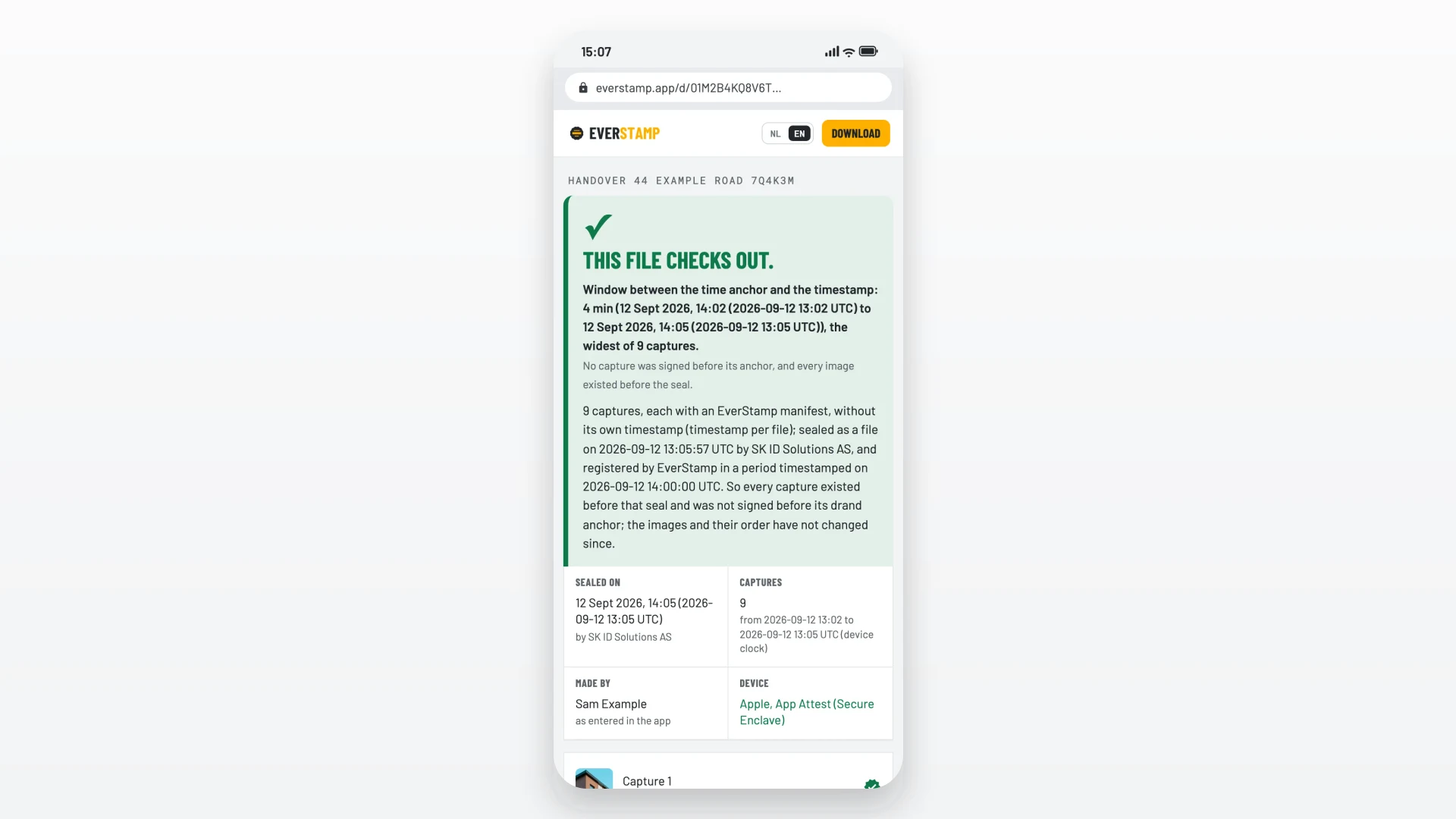
The landlord, rental company, insurer or builder does not need the app or an account. They drag the PDF or the archive onto the verification page. The checks run in their browser, and the file is not uploaded.
The page then says, in plain language, when the file was sealed, on which kind of device, what is inside it, and whether anything has changed. Most of the checks use open, public standards, so anyone can repeat them with their own tools. One check, which confirms that the file was made in EverStamp, comes from EverStamp itself.
The verification page has sample files to try, including a PDF with a forged timestamp date, so you can see what a failed check looks like.
Two other details help in practice:
- Nothing goes missing quietly. The number of photos is fixed in the sealed file, a photo you remove stays visible with your reason, and the other side can always ask for the whole file.
- Customer signature. On Plus and Business, a handover checklist can end with a signature on the phone, stored inside the sealed file rather than on a separate form.
Video
Videos go in the same file, up to 10 minutes each, with sound. The date and time are in every frame, and each video gets its own timestamp. Plus includes 10 minutes and 5 videos a month to try. Plus Video raises that to 60 minutes and 25 videos.
Video helps where photos leave gaps: a walk through a whole flat, a car from every angle in one take, or a leak while it is still running.
When to use a timestamp camera like EverStamp
EverStamp is useful for any moment where someone may later disagree with you about what something looked like. The most common ones:
| Moment | What to record | Who may check it |
|---|---|---|
| Picking up or returning a hire car | All four sides, the mileage and fuel, each scratch close up | The rental company, your card issuer |
| Moving into or out of a rented home | Every room, meter readings, damage that was already there | The landlord, the deposit scheme |
| Before building work next door | The party wall and existing cracks, with a ruler for scale | The neighbour, the surveyor, the insurer |
| Work for a client | Pipes, cables and insulation before they are closed up | The client, the main contractor |
| An insurance claim | The damage before you clear up, the cause, serial numbers | The insurer, the loss adjuster |
| Selling secondhand | The item, its serial number, the parcel packed and labelled | The buyer, the marketplace |
For businesses
The same file works for companies whose staff or customers take the photos, such as car rental firms, insurers, valuers, contractors and property managers. Business adds:
- A dashboard to send jobs with an address, a checklist and a person, and to see the status of every file
- Your own checklists, with your own steps and fields
- Requests, so a customer can take the photos from your link in the free app, without an account
- Search by licence plate or meter reading
- Webhooks and an API, so files arrive in your own system
- Optional storage of files at EverStamp
Business has a 14-day free trial with 20 files and no payment details.
EverStamp vs other timestamp camera apps
Timestamp camera apps such as Timemark and Timestamp Camera are popular for logging field work. They write the date, time and location onto the photo, and they are free or cheap. Here is how they compare with an ordinary photo and with EverStamp.
| Ordinary phone photo | Typical timestamp camera app | EverStamp | |
|---|---|---|---|
| Where the time comes from | The phone's clock, stored in the file | The phone's clock, written on the image | An independent timestamp service, approved under EU rules |
| Can the date be changed? | Yes, afterwards | Yes, by setting the phone clock before you shoot | No, any change shows up |
| How the other side checks it | They take your word for it | They take your word for it | In a browser, without an account |
| Open provenance record (C2PA) | No | No | Yes, a Content Credential on every photo |
| A series of photos | Loose files | Loose files | One file, with the order fixed and gaps visible |
| Price | Free | Often free or low cost | First file free, then from €7.99 a file or €12.99 a month |
If nobody is likely to question your photos, a regular timestamp camera app is enough. EverStamp is for photos that may end up in front of someone who disagrees with you.
EverStamp pricing
| Plan | Price | What you get |
|---|---|---|
| Basic | Free | Your first file free, then €7.99 for one file or €19.99 for three |
| Plus | €12.99 a month or €129.99 a year | 10 files a month, customer signature, your logo on the report, backup to your own cloud, password-protected share links for up to 90 days |
| Plus Video | €19.99 a month or €199.99 a year | Plus with 60 minutes and 25 videos a month |
| Business | From €99 a month | Dashboard, requests, your own checklists, webhooks and API |
| Enterprise | On request | A timestamp per photo, delivery into your own system, volume by agreement |
Personal plans include VAT and are paid in the app. Business and Enterprise prices exclude VAT.
Every plan, Basic included, gets the same seal and the same free check for the person receiving the file. Files you buy do not expire, even after a subscription ends.
Before you buy
Keep your files safe. On personal plans, your photos stay on your phone, and EverStamp only keeps a small fingerprint of each file. If you lose the file, EverStamp cannot recover it. Plus adds a backup to your own cloud storage.
Take the photos in the app. You cannot add photos from your camera roll, because every photo has to be signed when it is taken. Open EverStamp at the moment itself, not afterwards.
Legal weight depends on where you are. The eIDAS presumption is an EU rule. Outside the EU, how a court or company weighs an approved timestamp depends on local law.
Prices are in euros. Outside the euro countries, the App Store or Google Play converts the price.
Who it suits
If you rent a home or a car, EverStamp turns ten minutes of photos at the start and end into a record the landlord or rental company can check for themselves.
If you are a homeowner with building work starting next door, or a claim to make after a leak or a break-in, it records the damage with a date the other side can verify.
If you are a tradesperson, it records hidden work before it is closed up, with the client's signature in the same file.
If you run a business that collects photos from staff or customers, Business gives you the checklists, the requests and the API to collect them in one format.
Questions people ask
What is a timestamp camera?
A timestamp camera is an app that adds the date and time, and often the location, to photos as you take them. EverStamp also has an independent service seal the photos, so the other side can check when they existed and whether they have changed.
Can a timestamp on a photo be faked?
On an ordinary photo, yes. The date comes from the phone's clock or the file's data, and both can be changed. With EverStamp, the timestamp comes from an independent service with its own clock, and any later change to the file shows up.
Is EverStamp free?
Your first file is free. After that, a single file costs €7.99, three cost €19.99, and Plus costs €12.99 a month for 10 files.
Does the other person need the app?
No. They check the file at everstamp.app/verify in any browser, without an account.
Can EverStamp photos be used as evidence?
EverStamp gives you a record that anyone can check: when the photos existed, and that they have not changed. In the EU, an approved timestamp is presumed accurate for its date and time, and for the fact that the data has not changed since. How much weight a file carries is up to whoever settles the dispute, and what the photos show is still for them to judge.
Does EverStamp work on Android?
Yes. It works on iPhone and Android, and the recipient gets the same file and the same check either way.
Does it work without a signal?
Yes. The app signs each photo on the phone, and the seal follows when you are back online. The file shows how long it was offline.
Verdict
In many disputes about damage, the question is not what a photo shows, but when it was taken and whether it has changed. An ordinary timestamp camera cannot answer that, because the date comes from the phone.
EverStamp answers it. An independent service seals the file, every photo carries an open Content Credential, the other side checks it themselves in a browser, and the app is clear about what the seal covers and what it leaves to the viewer. The checklists help you capture everything the first time, which matters when there is no second chance to take the photo.
The first file is free, so the next time you pick up a hire car or get the keys to a flat, try it there. If you only need it now and then, single files cost less than a monthly plan.
👉 Try EverStamp, your first file is free
Browse more of our product reviews.
Want a review like this for your own product? Order a StartupBase review.
Productivity
Security
Mobile Apps





 Continue with Google