
DeepVerify is a Chrome extension from Factagora that detects factual claims on web pages, in YouTube videos and in live audio, then returns a verdict, a confidence score, the reasoning and the sources it used. This review covers the three verification modes, the way it marks up a video timeline before you watch, how it compares to PopUpFactCheck and to source rating tools like NewsGuard, the free and paid plans, and the questions worth asking before you rely on any automated fact checker.
Quick Answer
The problem with fact checking has never been that it is impossible. It is that it costs more than believing does.
Hearing a claim takes a second. Checking it takes opening a tab, working out what to search for, reading two sources that half agree, and then trying to remember what you were doing before. Most people abandon that somewhere around the second search result, which is not a failure of character. It is a reasonable response to the effort involved.
DeepVerify is a Chrome extension that tries to collapse that gap. It reads the page you are on, or the captions of the video you are watching, or the audio coming out of your speakers, picks out the statements that can be checked, and returns a verdict for each one.
It is made by Factagora, which also runs a public verification platform, a product called DeepStamp and an API. That is worth knowing before you decide whether to depend on it, because it tells you this is a company building verification infrastructure with a consumer product attached, rather than a weekend extension that might vanish.
This review is based on the public site and the Chrome Web Store listing. We did not install it or run claims through it, so nothing here is a judgement about whether the verdicts are correct, which is obviously the thing that matters most about a fact checker. What we can talk about is what it is designed to do, and the decisions behind that design, which are more interesting than the category usually manages.
The timeline is the best idea in it
The feature that deserves the most attention is not on the homepage at all. It is buried in the store listing.
When you open a YouTube video, DeepVerify pulls the transcript, finds the checkable claims, and puts a colour coded marker for each one directly on the video's progress bar. Before you have watched a second of it, the timeline itself tells you where the questionable moments are. There is also a reliability score for the video as a whole, on a five tier scale running from Highly Reliable down to High Misinformation Risk.
That is a genuinely good idea, because it changes what the tool is for. A fact checker that answers questions requires you to already be suspicious. A marked up timeline tells you where to be suspicious, which is the harder problem and the one people actually have. You do not know what you do not know to question.
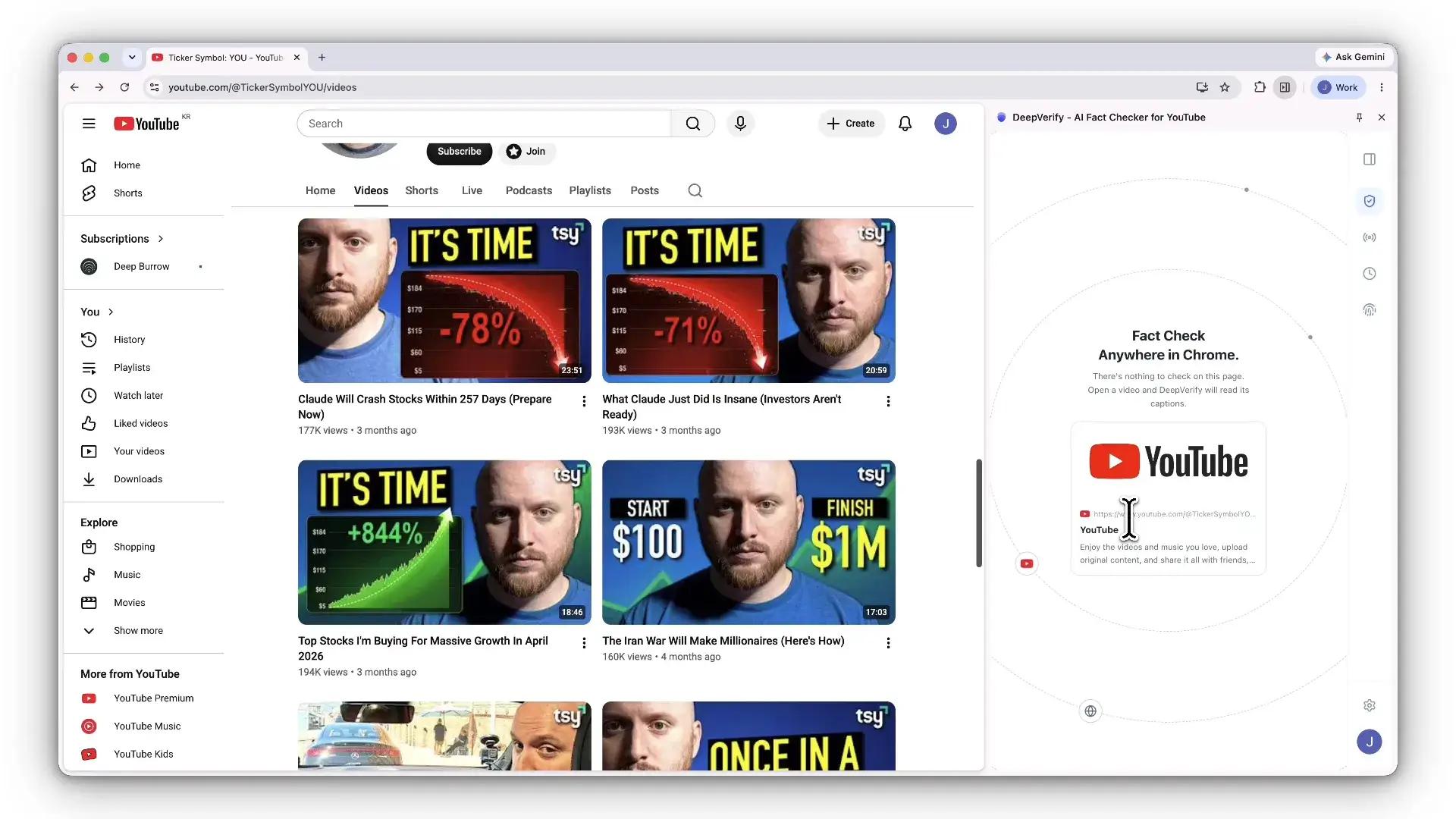
It goes one step further than that, and this is where reasonable people will disagree. If playback reaches a claim the tool has judged false, the video pauses on its own and shows a warning before you continue.
Showing the work
Any model can output the word "false". The part that determines whether a product like this is worth anything is what it offers alongside that word, and this is where most of DeepVerify's design effort has clearly gone.
Every verdict comes as a card with five things on it: the verdict itself, a confidence score, the reasoning behind the call, the actual documents that were checked, and a button to run the whole thing again. The example on their site is a claim about Microsoft's investment in OpenAI, marked Verified at 92 percent, with the reasoning naming Reuters, CNBC and Microsoft's own disclosures and explaining how the figures reconcile.
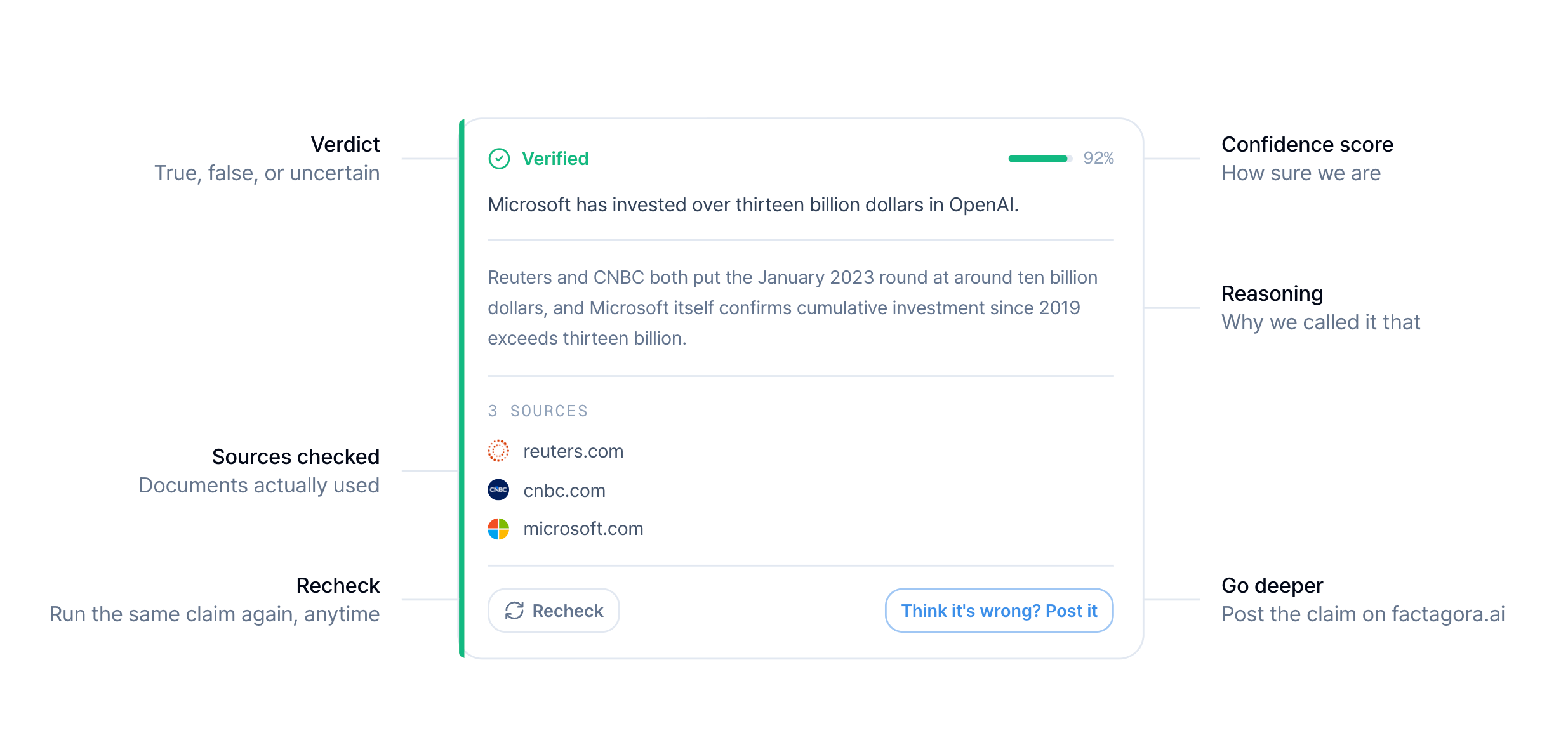
The confidence score is doing real work there. Their own examples show False at 62 percent and Uncertain at 55 percent, which is a useful admission: this is a probability, not a ruling. A tool that returned bare verdicts would be asking you to swap one authority for another, which is not an improvement on the problem it claims to solve.
Two smaller decisions are worth crediting. Verdicts are kept in a history you can re-run later, and on the paid plan there is a Then and Now comparison, which acknowledges something most fact checkers pretend is not true: the answer to a factual question can change. And when a claim comes back Uncertain, you can push it through to Factagora, their public platform, where it gets argued over rather than computed. Escalating the hard cases to people rather than pretending the model settled it is the right instinct.
The use nobody is talking about
One line in the store listing describes auto detect mode working on dynamic pages, "including AI chat interfaces, picking up new content as it loads."
That is the most interesting sentence about this product and it appears nowhere on the marketing site.
Fact checking a chatbot's output as it generates is a much sharper use than fact checking a news article. Articles have bylines, publishers and a correction policy. A chat response has none of those and arrives in the same confident register whether it is right or invented. If DeepVerify reliably flags claims in a chat window, that is a stronger reason to install it than anything on the homepage.
Three ways in
The rest of the product is three modes, all on by default.
Instant verify is a highlight. Select a sentence anywhere, or press Alt and D, and a verdict appears where you are reading, with the highlighted text changing colour to match the result.
Auto detect scans the page without being asked, outlines the claims it finds in the text, and shows a corner notification when something comes back false.
Live audio captures your microphone or the audio playing in the current tab, transcribes it as it happens, and checks claims while the conversation is still going. This is aimed at livestreams, webinars and calls, and it is the mode that most clearly could not have existed a few years ago.
The extension ships in English and Korean, which is a small detail worth drawing out. Fact checking outside English is badly served, and a tool that handles Korean sources natively is doing something most of this category has not attempted.
How it compares
There are two different things sold as fact checking and it is worth separating them, because people choose the wrong one.
Source raters score publications rather than claims. NewsGuard rates tens of thousands of sites against journalistic criteria. Ground News and AllSides show you the political spread of coverage on a story. These are useful and they answer a different question: whether a publisher is generally reliable, not whether the sentence in front of you is true. A trustworthy outlet can print a wrong number, and a poor one can print a right one.
Claim checkers judge the individual statement. This is the harder job and it is where DeepVerify sits, alongside a small number of others.
The direct comparison worth making is PopUpFactCheck, which also does real time claim checking on YouTube, including live streams, and which runs on Firefox as well as Chrome. It is the sharper competitor and the honest points go both ways.
| DeepVerify | PopUpFactCheck | |
|---|---|---|
| YouTube claim checking | Yes | Yes |
| Ordinary web pages | Yes | No |
| Highlight any sentence | Yes | No |
| Live audio from any tab or your mic | Yes | No, YouTube only |
| Firefox | No | Yes |
| Account required | Yes | No |
| Cheapest paid plan | $30 a month | $9.99 a month |
Read that table before deciding, because it points somewhere specific. If your entire need is YouTube, PopUpFactCheck is cheaper, needs no signup and runs on more browsers. DeepVerify costs three times as much and earns it only if you want the other three quarters of the product: any web page, any highlighted sentence, and live audio from a webinar or a call rather than from a video.
That leads to the one piece of their own marketing we would push back on. The pricing section is headed with a claim about being half the price of other fact checking services with more checks included. Against enterprise verification tools that may well be true. Against the nearest competitor doing the same job on YouTube it is not, and a reader who checks will notice. The strength here is breadth, not price, and we would lead with that instead.
What it costs
Free to install, which is true, and worth spelling out beyond that.
| Free | Pro | Max | |
|---|---|---|---|
| Price | $0 | $30 a month | $220 a month |
| Documents | 3 a day, 20 a month | 10 a day, 150 a month | 60 a day, 1,000 a month |
| Auto verified claims per document | 5 | 20 | Unlimited |
| Live audio | Not included | 300 minutes a month | 1,200 minutes a month |
| History | Stored locally only | Server synced, plus Then and Now | Plus export |
Yearly billing saves 17 percent, and adding a card gets you the first month free.
Two things follow from that table. The free tier is a trial in practice rather than a plan you settle into: twenty documents a month at five claims each is enough to decide whether you like it and not much more. And live audio, the most distinctive thing the product does, is not in it at all. If that mode is why you are here, the real price is $30 a month.
One thing the pricing page does not answer clearly is what counts as a document. Three a day is a very different allowance depending on whether reopening the same article tomorrow spends another one. Their FAQ raises the question, and it is the first thing we would want stated plainly on the pricing table itself, because it is the difference between a usable free tier and a restrictive one.
The jump from $30 to $220 is steep, but the Max tier is clearly aimed at newsrooms, research teams and compliance work rather than individuals, and the audit reports listed as coming soon point the same way.
Things to weigh before installing
Four, and none of them are dealbreakers so much as decisions.
The auto pause is a strong move on a probabilistic call. Stopping a video is an editorial act, and their own screenshots show false verdicts landing at 62 percent confidence. That is a reasonable basis for a flag and a thin basis for an interruption. It is adjustable per their listing, and the first thing we would look at.
Scoring a whole video is heavier than scoring a sentence. The five tier reliability rating, running down to High Misinformation Risk, is a judgement about a creator's work rather than a single claim, derived from the claims underneath it. If two claims out of thirty are wrong, the label a viewer remembers is the one at the top. That is a lot of weight resting on the claim detection being right about which sentences were even checkable.
Somebody has to choose the sources. This is the standing objection to every fact checker and it deserves a straight answer rather than a dodge. DeepVerify draws on academic databases, established news organisations, government and regulatory sources, and peer reviewed journals. Some readers consider that selection a position in itself, particularly on contested political topics. The defence is not that the selection is neutral, because no selection is. It is that the product shows you the specific documents behind each verdict, so you can disagree with the evidence rather than with a verdict handed down. A fact checker that hid its sources would deserve the objection. One that publishes them is asking to be argued with, which is the correct posture.
It sees a great deal. To check the page you are reading it has to read the page you are reading, and live audio means microphone and tab audio permission. The store listing discloses collection of web history and website content, and states data is not sold. Their FAQ covers where history is stored and how to delete it. That is a fair disclosure and still a real decision, particularly if you browse anything sensitive.
And one piece of context rather than a warning. The extension is on version 0.1.33 and was updated the day before we looked, so the team is shipping quickly, but you would be an early user of a product whose core promise is accuracy, and there is not yet a long public record of how often it gets things right. Their own FAQ is refreshingly straight about this, describing results as a strong starting point rather than a final verdict, particularly for fast moving topics and decisions with money at stake. We would repeat that line rather than argue with it.
Who it suits
The clearest fit is anyone whose day involves reading claims they cannot personally verify and that carry a cost if wrong. Journalists, analysts, researchers, students, and people making investment decisions off content rather than filings.
It suits you if your checking is not confined to YouTube. That is the whole case for paying more than the alternatives cost: articles, highlighted sentences, chat output and live calls are all in scope, and no other tool in this category covers that spread.
It suits you less if you only watch videos, where a cheaper and narrower option does the same job. And it suits you less if you want a machine to tell you what is true and stop there. This product does not do that, deliberately, and the parts that make it trustworthy are the parts that ask for more of your attention rather than less.
Questions people ask
What is DeepVerify?
A Chrome extension from Factagora that detects factual claims on web pages, in YouTube videos and in live audio, then returns a verdict of Verified, False or Uncertain with a confidence score, the reasoning, and links to the sources it used.
Is DeepVerify free?
Installing is free, and the free plan covers 3 documents a day up to 20 a month with 5 automatically verified claims each, with history stored only on your own machine. Live audio is not included. Pro is $30 a month and Max is $220 a month, with 17 percent off annual billing.
How does DeepVerify compare to PopUpFactCheck?
PopUpFactCheck covers YouTube only, needs no account, runs on Firefox as well as Chrome, and starts at $9.99 a month. DeepVerify costs more and covers considerably more: ordinary web pages, any highlighted sentence, and live audio from your microphone or any browser tab. Choose on breadth rather than on price.
How is it different from NewsGuard or Ground News?
Those rate publications and coverage rather than individual claims. They tell you whether a source is generally reliable. DeepVerify judges the specific sentence in front of you, which is a different and harder question.
What does it check claims against?
Their site lists academic databases, established news organisations, government and regulatory sources, and peer reviewed journals, and every verdict links back to the specific documents used so you can read them yourself.
Can I disagree with a verdict?
Yes, and this is one of the better parts of it. Any claim can be re-run, and uncertain ones can be pushed to Factagora's public platform to be argued rather than computed.
Verdict
The easy version of this product would have been a model, a verdict, and a green tick. That version would have been quicker to build and worth very little, because the whole difficulty in this category is that nobody should believe an automated fact checker on its own say so.
DeepVerify has built almost everything around that difficulty instead. The confidence scores, the visible sources, the re-check button, the Then and Now comparison, the route to a human argument when the machine is unsure: all of it is designed by people who understand that the verdict is the least defensible thing they produce.
Whether the verdicts hold up is a question this review cannot answer, and it is the one that will decide the product. What we can say is that the marked up timeline is a real idea, the chat interface use is a better pitch than the one they are currently making, and the breadth beyond YouTube is the thing that justifies the price. The design is honest about its own limits in a way that most of this category is not, and that is worth more than a green tick.
👉 Install DeepVerify, or read the documentation first.
Want a review like this for your own product? Order a StartupBase review.
AI Tools
Browser Extensions
Research








 Continue with Google