ExtraDock
Create more docks for your Mac, on any screen.
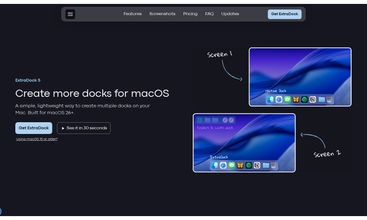
macOS gives you one Dock. If you run more than one monitor it jumps between screens. ExtraDock fixes that: put a dock on every display, and make each one yours.
Keep it simple and create another instance of your Dock, or go further. A Live Dock mirrors your macOS Dock on any screen. A Space-aware dock shows only the apps running in the Space you're on. Show only running apps, hide Finder or Trash, group folders with Folder Stacks, and drop files onto the Shelf.
Docks follow their monitors and hide or show as they connect and disconnect. Each dock gets its own behavior: auto-hide, collapse, hide on fullscreen, app previews on hover. Snap it to an edge, float it anywhere, or put it in the notch.
It's very, VERY customizable: colors, custom app icons, effects, magnification, Liquid Glass, even a fully invisible dock. Use it alongside your macOS Dock or replace it.
ExtraDock 5 is built for macOS 26 Tahoe. ExtraDock 4 covers macOS 12 to 15, and one license runs both. One-time payment, 14-day money-back guarantee.



Trending Products
View all









Outrank
 🥇
aelívra
A personalised wellbeing platform that combines health records, symptoms, wearables, and evidence-based protocols for sleep, energy, nutrition, stress, and recovery.
🥇
aelívra
A personalised wellbeing platform that combines health records, symptoms, wearables, and evidence-based protocols for sleep, energy, nutrition, stress, and recovery.
 🥈
The Board
A public leaderboard where brands buy ranked spots, show a logo and link, and compete for attention through bids and takeovers.
🥈
The Board
A public leaderboard where brands buy ranked spots, show a logo and link, and compete for attention through bids and takeovers.
 🥉
ScholarSail
AI study tools for students that turn notes into mind maps, spaced-repetition flashcards, and 3D memory palaces while organizing focused work.
🥉
ScholarSail
AI study tools for students that turn notes into mind maps, spaced-repetition flashcards, and 3D memory palaces while organizing focused work.







 Continue with Google