DisplayBuddy
Control the brightness of monitors directly from your Mac and Windows
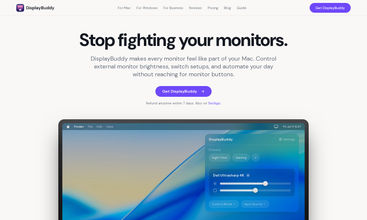
DisplayBuddy is a full fledged display manager for Mac and Windows.
Features
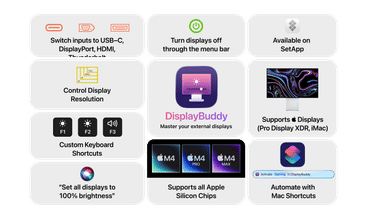
- Control your monitor’s brightness & contrast directly from your Mac and Windows
- Control the volume for monitors with built-in speakers
- Switch monitor inputs (HDMI, DisplayPort, USB-C etc) directly from the app, and even turn off displays
- Sync brightness across multiple displays and effortlessly manage them with ease
- Save settings across displays as Presets, and activate them later with a single click!
- Control the real volume, input source, power and full remote of Samsung Smart monitors, like the Samsung M5, M7, M8 and ViewFinity S9.
- Adjust the brightness of Sidecar, DisplayLink and Airplay displays
- Designed for modern macOS and Windows 11, and looks great in both Light & Dark modes.
Share your take on this product
Comment
Write at least
20
characters. Specific feedback improves community quality.
No comments match your search.
Write at least
20
characters. Specific feedback improves community quality.
Trending Products
View all








No reviews match your search.
No team details yet.
No active deals right now.
Outrank
 🥇
aelívra
A personalised wellbeing platform that combines health records, symptoms, wearables, and evidence-based protocols for sleep, energy, nutrition, stress, and recovery.
🥇
aelívra
A personalised wellbeing platform that combines health records, symptoms, wearables, and evidence-based protocols for sleep, energy, nutrition, stress, and recovery.
 🥈
The Board
A public leaderboard where brands buy ranked spots, show a logo and link, and compete for attention through bids and takeovers.
🥈
The Board
A public leaderboard where brands buy ranked spots, show a logo and link, and compete for attention through bids and takeovers.
 🥉
ScholarSail
AI study tools for students that turn notes into mind maps, spaced-repetition flashcards, and 3D memory palaces while organizing focused work.
🥉
ScholarSail
AI study tools for students that turn notes into mind maps, spaced-repetition flashcards, and 3D memory palaces while organizing focused work.
🚀 Want this spot?
Pay what you want









 Continue with Google